
🔔 Note: this article is part of the CartonCloud Academy - TMS Basic Setup Trail. Please ensure you have read Get Started with Custom Fields - Transport first. 🎓
What are Delivery Runs?
Delivery Runs in CartonCloud are the geographical boundaries of the places your operation delivers to.
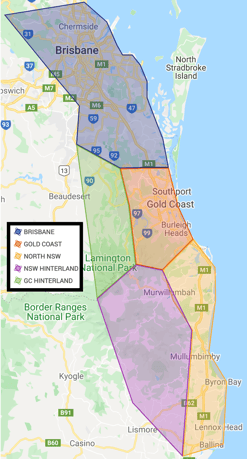
For example, the map below shows the different areas on the Gold Coast that Coffee Warehousing and Distribution deliver to. When Nick creates his Delivery Runs in CartonCloud, he will create a Delivery Run for each of these areas.
Map of different areas Coffee Warehousing and Distribution delivers to:
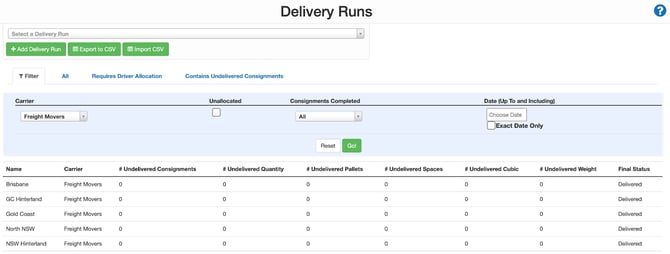
Corresponding Delivery Runs in CartonCloud:
Follow along with Vincent as he gives you a brief overview of what a Delivery Run is (you can stop watching after timestamp 1:14)
What are the benefits of Delivery Runs in CartonCloud?
Nick is super excited about using Delivery Runs in his operation as he will be able to break the Consignments into manageable quantities during allocation. This will enable an efficient and automatic allocation process in CartonCloud, meaning less manual work for Nick and his team!
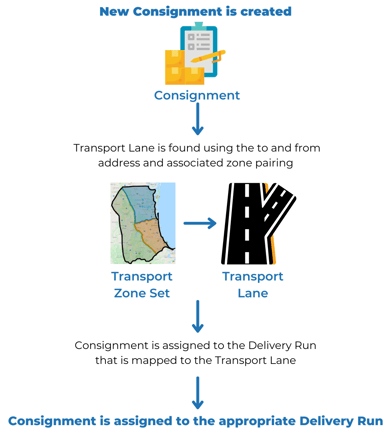
CartonCloud will automatically allocate a Consignment to the appropriate Delivery Run depending on its pick-up location and delivery location. CartonCloud does this using the pickup location and delivery location on a Consignment (and the associated Transport Zone Set) to know what Delivery Run it needs to allocate it to. CartonCloud does this using address mapping and configurations you have set up on your Transport Lanes. Transport Lanes map the to and from address to the corresponding Delivery Run. Transport Lanes and Transport Zone Sets will be covered in later units; however, for now, use the below diagram to understand better how the automatic allocation to a Delivery Run works.
Create a Delivery Run
Now that you know what a Delivery Run is, it is time to create them in your own CartonCloud account. Follow along with Vincent, as he explains what a Delivery Run is and how to add one to your account (if you watched the start of the video in the previous unit, you can skip to timestamp 1:14)
Nick now understands what a Delivery Run is and how to set them up in his CartonCloud account. All he needs to do is go ahead and create his Delivery Runs! If you already know what your Delivery Runs will be then we suggest you create one now. Otherwise, if you are still yet to determine what your Delivery Runs will be, you can come back to this unit later.
Want to add more Delivery Runs?
If you already know what all your Delivery Runs will be, then you can create your Delivery Runs in bulk! To do so, you can use the export/import function. Follow the steps on the Knowledge Base page How to add a Delivery Run under the Export/Import Delivery Runs section.
Want to add more Carriers?
A Carrier in CartonCloud is a transport carrier (for example a delivery, trucking or freight company) who delivers your transport jobs (Consignments). To create a Carrier, see this page.
▶️ Follow along in the TMS Basic Set Up Trail...next up is Get Started with Transport Zone Sets 🎓