
Please note that if your CartonCloud account was created prior to 1 July 2019 the below functionality may not be available at this stage. If you would like to discuss migrating to the newer version of the CartonCloud TMS, please use CartonCloud Help and lodge a case with our Service Desk.
CartonCloud has the ability to automatically assign a new consignment to the appropriate Delivery Run. For this functionality to work, you must set up your Delivery Runs, Transport Zone Sets, and Transport Lanes.
Follow the below steps to enable CartonCloud to automatically assign your consignments.
The below diagram helps to explain how CartonCloud uses Delivery Runs, Transport Zone Sets, and Transport Lanes to automatically assign a consignment to a Delivery Run.
Note, Sale Orders will also follow the same Zone Sets and Transport Lanes logic when determining the expected Delivery Run (unless a default Delivery Run has been set up in the Warehouse Settings). The Warehouse address of the Sale Order will be utilised as the collect address and the conditions in the Transport Lane that are related to Consignments will not be included in the logic when determining the Sale Order Delivery Run. 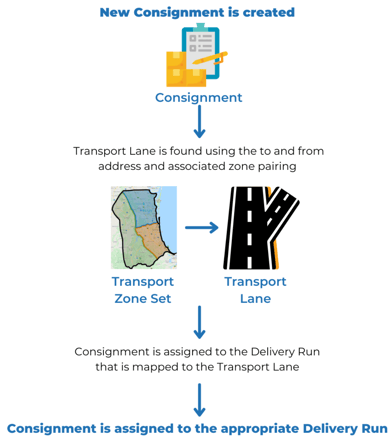
Delivery Runs: How you divide your consignments into manageable quantities for delivery.
Transport Zone Sets: These are the zones your operation uses for assigning consignments.
Please note, that the Transport Zone matched to the Consignment will depend upon the criteria below.
For example, for an address in New Zealand, both the Suburb AND Postcode on the Consignment's address must match to find the correct Transport Zone.
| Location Entries Type | Country | Matching Criteria |
| Australia Locations | Australia | State AND Suburb AND Postcode |
| Global Locations | New Zealand | Suburb AND Postcode |
| Global Locations | All other countries | Suburb OR Postcode |
Please see Zone Set Matching Criteria for more information.
Transport Lanes: Provides the logic for CartonCloud to know what Delivery Run a consignment needs to be assigned to.
First step: Setting up Delivery Runs