
Table of Contents
- Purpose
- Application of a transport lane
- How CartonCloud automatically assigns the consignments to a delivery run
- ABC transport consignment example
Purpose
Please note that if your CartonCloud account was created prior to 1 July 2019 the below functionality may not be available at this stage. If you would like to discuss migrating to the newer version of the CartonCloud TMS, please use CartonCloud Help and lodge a case with our Service Desk.
Transport Lanes contain the logic and rules that dictate what Delivery Run a consignment is assigned to. Defining this logic in the Transport Lane enables CartonCloud to automatically assign consignments to the appropriate Delivery Run. The logic is defined using both your Transport Zone Set (the defined geographical zones your operation delivers to) and your Delivery Runs (how you operationally group your consignments for allocating activities to drivers and vehicles).
Application of a transport lane
To understand the application of Transport Lanes we will use an example delivery consignment for ABC Transport travelling from Burleigh Heads to Paradise Point. ABC Transport has created a Transport Lane that specifies that any delivery consignment moving from the GC Metro zone must be assigned to the 'Metro Daily' Delivery Run.
Using the logic defined in the Transport Lane, CartonCloud will match the consignments to and from zone to the corresponding Delivery Run.
How CartonCloud automatically assigns the Consignments to a Delivery Run
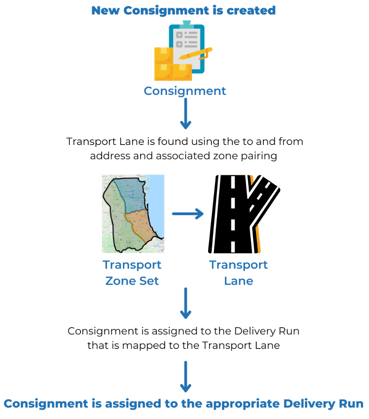
ABC Transport Consignment Example 
To set up your Transport Lanes, please see Setting up Transport Lanes