
Table of Contents
- Overview
- Changes to Fuel Levy Handling
- How Fuel Levy Charges work in CartonCloud
- Fuel Levy Charges on Consignments
- Fuel Levy Charges in Reports
- Relationship to the existing Fuel Levy setting
This article covers the Fuel Levy Charges. For information on configuring the base Fuel Levy percentage and rate card settings, see the Fuel Levy article.
Overview
Fuel Levy Charges changes the way fuel levy amounts are stored within CartonCloud. Rather than being applied solely as a modifier to transport charges, fuel levy amounts are now recorded as individual charge records against consignments. This brings fuel levy handling into line with the way other charges are managed within CartonCloud.
Changes to Fuel Levy Handling
Previously, fuel levies in CartonCloud acted as a modifier on consignment charges — they calculated a fuel levy amount and aggregated it into the invoice total, but did not create a distinct charge record in the database. This meant:
-
Fuel levy amounts were not visible in the Charges Report or the BI Tool.
-
Invoice Summaries could display incorrect fuel levy figures if the fuel levy rate had changed since the charges were originally calculated.
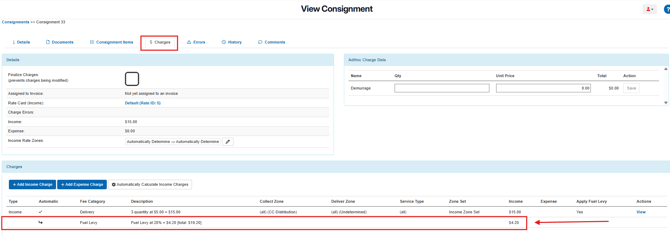
Following this change, each charge with Apply Fuel Levy enabled generates a dedicated fuel levy charge record. These charge records:
-
Appear directly below the charge they relate to on the consignment's Charges tab.
-
Display a description showing the levy percentage and dollar amount, for example: Fuel Levy at 17% = $1.70 [total: $11.70]
- Are now included in Consignment Income, meaning the Consignment Income total includes the applicable fuel levy amount.
-
Are included in the Bulk Export Charges Report, making fuel levy amounts fully reportable and exportable.
-
Are stored as individual charge records in the database, ensuring invoice accuracy even if the fuel levy rate changes after charges are calculated.
Fuel levy charges use a parent-child relationship with the charge they relate to. If the parent charge is deleted, its associated fuel levy charge is automatically removed.
How Fuel Levy Charges work in CartonCloud
Fuel levy charge records are automatically created when charges are calculated on a consignment, provided the Transport Rate has Apply Fuel Levy enabled. No additional configuration is required beyond the existing Fuel Levy setup on your Rate Cards and Transport Rates.
To review or update your Fuel Levy configuration, see the Fuel Levy article.
When charges are calculated:
-
One Fuel Levy charge is created for each charge that has Apply Fuel Levy set to Yes.
-
The fuel levy charge appears immediately below its parent charge in the Charges tab of the consignment.
-
The fuel levy description follows the format: Fuel Levy at [%] = [$amount] [total: $total]

Fuel Levy Charges on Consignments
To view Fuel Levy Charges on a consignment:
-
Navigate to the Consignment. You can find consignments by typing Consignments in the Search for anything bar, or by navigating to Transport > Consignments.
-
Select the relevant Consignment to open it.
-
Select the Charges tab from within the Consignment view.
-
Fuel levy charge records will appear listed directly below the charge they relate to.
Fuel Levy Charges in Reports
Fuel levy charge records are visible and exportable from the Bulk Export Charges Report. This allows you to report on fuel levy amounts alongside all other charge types. Fuel Levy charge line items will be included in the export with their charge description, amount, and the consignment they relate to.
For full details on how to create the Bulk Charges Report, see the Bulk Export Charges Report article.
Relationship to the existing Fuel Levy setting
The Fuel Levy Charges changes how fuel levy amounts are stored, but does not change how fuel levy rates are configured. Your existing Fuel Levy setup — including the Base Fuel Levy, Rate Card offsets, and Transport Rate overrides — continues to work as before.
The key difference is:
|
Before Fuel Levy Charges |
With Fuel Levy Charges |
|
Fuel levy was a modifier — calculated and added to invoice totals but not stored as a charge record. |
Fuel levy is stored as a dedicated charge record against the consignment. |
|
Fuel levy amounts were not visible in the Charges Report or BI Tool. |
Fuel levy charges appear in the Charges Report and are exportable via Bulk Export Charges Report. |
|
Invoice Summaries could show incorrect amounts if the levy rate changed after calculation. |
Charge records are stored at the time of calculation, so the amount remains accurate even if rates change. |
For full details on configuring the Fuel Levy percentage and applying it to Rate Cards and Transport Rates, see the Fuel Levy article.