
Table of Contents
- Overview
- Prerequisites
- How to Add or Update International Shipping Fields?
- Field Guide
- Bulk Management (Import and Export)
Overview
When shipping products internationally, customs authorities require specific information about what is being shipped and where it originated. CartonCloud allows you to store this information directly against your warehouse products, so it is available automatically when generating international shipments.
The International Shipping section on the Product page contains four fields that are used for this purpose: Country of Origin, Harmonised System Code, Product Description, and MID Code.
The fields below are grouped together in the International Shipping section at the bottom of the Add/Edit Product page. They are optional — you only need to complete the fields that are required by your carrier or customs authority for the countries you ship to.
|
Field |
Description |
Required? |
|
Product Description |
A plain-text description of the product. This description is provided to customs when shipping internationally. |
Optional |
|
Country of Origin |
The country where the product was manufactured or produced. Selected from a searchable dropdown. |
Optional |
|
Harmonised System Code |
A standardised numeric code used internationally to classify products for customs. Also known as an HS Code or Tariff Code. |
Optional |
|
MID Code |
A Manufacturer Identification Code that identifies the manufacturer or supplier of the product. See the MID Code article for full details. |
Optional |
These fields apply to warehouse products only. Transport products are not affected.
Prerequisites
The International Shipping fields follow the same access rules as all other product fields in CartonCloud. The following users can add or update these fields:
-
You must have administrator access to your CartonCloud account, or be a customer user who has been granted access to add products.
-
The product must already exist in CartonCloud, or you must be creating a new one.
Important: When using "Carrier Rates", a weight must be set on the Warehouse Product for carrier rates to be calculated for international shipping. If no weight is configured, carrier rates will not be returned. Navigate to Warehouse > Products to update product weights before processing international shipments.
How to Add or Update International Shipping Fields?
International Shipping fields are added and updated through the Products page. You can complete them when creating a new product or by editing an existing one.
- Navigate to the Products page. From the main menu, go to Warehouse > Products.
- Locate the product you want to update and click Edit next to it. To add fields to a new product, click +Add Product.
- Scroll to the bottom of the page and click International Shipping to expand the section.
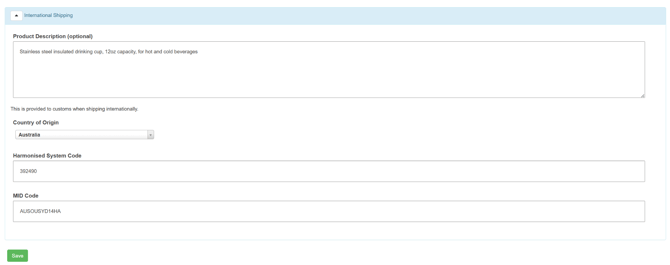
- Complete the relevant fields. See the Field Guide below for details on each field.
- Click Save.
The International Shipping fields are now saved against the product and will be available when generating international shipments.
Field Guide
Country of Origin
The Country of Origin is the country where your product was manufactured or produced. It is used by customs authorities to determine duties, taxes, and import/export restrictions that apply to the shipment.
The Country of Origin can be different from the country your warehouse operates in. For example, a product stored in an Australian warehouse may have been manufactured in Vietnam.
Setting the Country of Origin is independent of the 'Allow International Addresses' organisation setting. You can record a Country of Origin outside your home country even if international addresses are not enabled on your account.
|
Product |
Country of Origin |
|
Stainless steel insulated coffee cup |
China |
|
Men's cotton t-shirt |
Bangladesh |
|
Wooden dining chair |
Vietnam |
Harmonised System Code
A Harmonised System (HS) Code is a standardised numeric code used internationally to classify products for trade and customs purposes. The same product has the same HS Code regardless of which country it is being shipped from or to.
HS Codes are maintained by the World Customs Organization (WCO). The standard code is 6 digits, however some countries use extended versions — for example, China uses a 13-digit code.
If you are unsure of the correct HS Code for your product, check with your customs broker or refer to your country's official tariff schedule.
|
Product |
HS Code |
|
Stainless steel insulated coffee cup |
392490 |
|
Men's cotton t-shirt |
610910 |
|
Wooden dining chair |
940360 |
The Product Description is a plain-text description of the product that is provided to customs when shipping internationally. It should clearly describe what the product is in plain language — for example, 'Men's cotton t-shirt' rather than an internal product code or name.
|
Product |
Product Description |
|
Stainless steel insulated coffee cup |
Stainless steel insulated drinking cup, 12oz capacity, for hot and cold beverages |
|
Men's cotton t-shirt |
Men's 100% cotton t-shirt, short sleeve |
|
Wooden dining chair |
Wooden dining chair with upholstered seat, for indoor use |
Manufacturer Identification Code (MID)
A Manufacturer Identification Code (MID) is a reference number used in customs documentation to identify the manufacturer or supplier of the goods being shipped.
For full details on MID Codes — including what they are, how to generate one, and how to update or remove a MID Code — see the Manufacturer Identification Codes (MID) article.
Bulk Management (Import and Export)
Country of Origin, Harmonised System Code and Product Descriptions are supported in the CartonCloud product import and export, allowing you to manage these fields in bulk rather than editing products one at a time.
MID Code are not currently supported in product import/export. These fields must be set manually through the Add/Edit Product page. Import/Export support will be added soon.