
Table of Contents
- Overview
- Why are MID Codes important?
- How to find or generate a MID Code?
- How to add a MID Code to a product in CartonCloud?
- How to update or remove a MID Code?
- MID Code via API
- Key Considerations
Overview
A MID Code is a short alphanumeric identifier that represents the manufacturer or supplier of a product. It is included in the customs data sent with international shipments so that customs authorities can identify where goods were manufactured.
In CartonCloud, MID Codes are stored against individual warehouse products and are included automatically when customs data is generated for international orders.
MID Codes apply to warehouse products only. Transport products do not contain MID codes.
Why are MID Codes important?
When shipping goods internationally, customs authorities require accurate information about the origin and manufacturer of those goods. Without a correctly formatted MID Code, your shipment may experience delays, be held at customs, or be returned to the sender.
How to find or generate a MID Code?
MID Codes are not assigned by a central authority — you generate them using a standard formula based on the manufacturer's details.
Formula: Country Code (2 letters) + First 3 characters of Manufacturer Name + First 3 characters of City + First 4 characters of Street Address
Example: A manufacturer called "Pacific Goods Pty Ltd" located at 22 Marine Parade, Brisbane, Australia would have a MID Code of: AUPACBRI22MA
- Country Code: AU (Australia)
- Manufacturer Name (first 3 characters): PAC (Pacific)
- City (first 3 characters): BRI (Brisbane)
- Street Address (first 4 characters): 22MA
If you are a 3PL, your customers who ship internationally will need to provide MID Codes for each of their suppliers.
How to add a MID Code to a product in CartonCloud?
MID Codes are added through the Product page in CartonCloud. You can add a MID Code when creating a new product or by editing an existing one.
Prerequisites
- You must have administrator access to your CartonCloud account, or be a customer user who has been granted access to add products.
If you are a customer user, the ability to add products is controlled by a setting on your account. This can be enabled or disabled by your Warehouse Administrator at the Organisation Settings level or on a per-customer basis. For more information, see the Customer Settings - Warehouse Management (Product tab) article. Please also note that once a product has been created by a customer user, the product record can only be edited by Warehouse Administrators from that point forward. For more information, see the Products (Customer) article. - The product must already exist in CartonCloud, or you must be creating a new one.
Steps
- Navigate to the Products page. From the main menu, go to Warehouse > Products.
- Locate the product you want to update and click Edit next to it. If you are creating a new product, click +Add Product.
- Scroll to the bottom of the page and click International Shipping to expand the section.
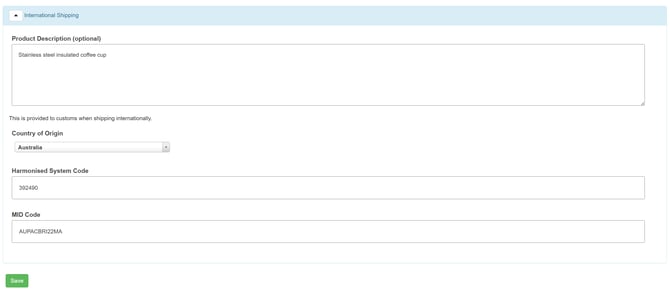
- Enter your MID Code. MID Codes must be alphanumeric only (letters and numbers), and no longer than 15 characters. CartonCloud will automatically convert the value to uppercase when you save.
- Click Save to save the product.
The MID Code is now saved against the product and will be included in customs data for international shipments.
How to update or remove a MID Code?
You can update or remove a MID Code at any time by editing the product.
- Navigate to Warehouse > Products and locate the relevant product.
- Click Edit next to the product.
- In the International Shipping section, update the value in the MID Code field, or clear the field entirely to remove the MID Code.
- Click Save.
MID Code via API
If you manage products via the CartonCloud API, MID Codes are supported on warehouse product endpoints. Refer to our public API docs.
Key Considerations
- MID Codes are optional in CartonCloud. However, they may be required by your carrier for international shipments — check with your carrier if you are unsure.
- MID Codes can only be letters and numbers — no spaces, hyphens, or special characters are accepted.
- CartonCloud automatically converts MID Codes to uppercase when saving.
- If you leave the MID Code blank for a product used in an international shipment, this may result in customs delays depending on your carrier's requirements.
- MID Codes apply to warehouse products only — transport products are not affected.
Leaving the MID Code blank on products included in international shipments may result in customs delays or rejected shipments for carriers that require this field.