Table of Contents
Purpose
Wave Pick process types determine how a Wave Pick is configured and how it is completed. A Wave Pick process type must be selected when creating a Wave Pick. There are four different process types each designed for differing warehouse requirements and processes:
- Bulk Pick
- Split Pick and Pack
- Combination
- Pick to Tote
Each process type is designed to optimise the picking workflow and streamline your operations.
See Wave Picking for more information on Wave Picking and how to create a Wave Pick.
Wave Pick Process Types
Bulk Pick
When using Bulk Pick, you will be picking orders simultaneously by the product rather than order-by-order. This is especially useful if there are limited pick-face locations to pick from and forklifts are required to pick the products.Once an order is marked as picked the Sale Order will be updated to the 'Packed' status. When using this workflow the picking and packing processes are combined into one. Once the orders are picked they will be moved out of the Warehouse. For example, the orders are moved to a dock or delivery truck where they will be sorted for delivery using their labels.
Please note, if you are wanting to capture certain custom fields on outbound (i.e: recording serial numbers as they ship), you can not use a Bulk Pick Wave Pick. You will need to use either Split Pick and Pack or Combination Wave Pick.
Example:
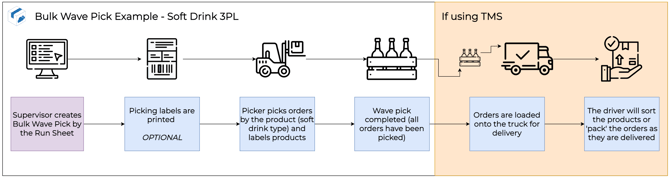
A soft drink 3PL is using Bulk Wave Pick by the Run Sheet. They will pick all the different orders (by the soft drink type, not the Sale Order) and load them into the delivery truck. As the driver delivers the goods he will complete the 'packing' process by sorting the soft drinks by the order using their labels.
Split Pick and Pack
Split Pick and Pack works similarly to Bulk Pick, where orders will be picked by the product, not order-by-order, however, the packing and picking process is separated. Once picking is completed, the user will be prompted to then pack each Sale Order individually, however, this will not necessarily be the same user. In some cases, the pick and pack process may be split, in which case the packer will take over the wave pick once the picking is complete. This is useful when picking and packing occur at two different locations in the warehouse or completed by a different user.
Example:
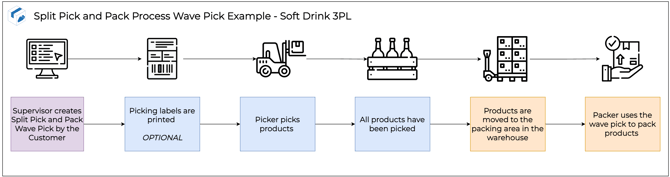
The 3PL has a separate area for where packing occurs and two teams, one for picking and one for packing. Pickers will pick all orders by the product and then move the goods to the packing area where another team will pack the orders (using the wave pick) ready for dispatch.
Combination
Combination wave pick allows multiple Sale Orders to be grouped together for either a specific Customer or Run Sheet. This is the exact same way a Sale Order is normally picked and packed, however, it provides a way for orders to be grouped and then assigned to pickers. The Wave Pick can be assigned to the picker by naming the Wave Pick by the pickers name.
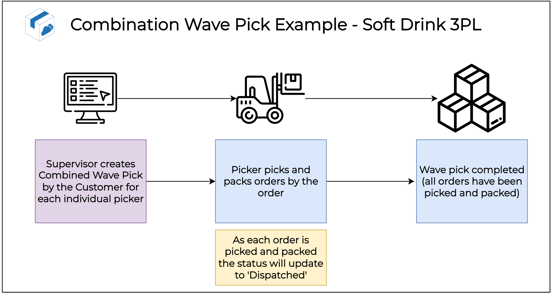
The 3PL has multiple pickers to which they assign wave picks. The pickers will complete both the pick and pack process as they move through the Warehouse.
Pick to Tote
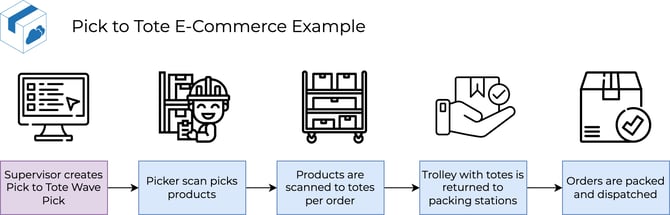
Pick to Tote is a picking workflow designed to reduce the time spent picking. This is achieved by allowing pickers to pick multiple orders (usually 10-30) simultaneously, sorting them into totes as they go. This reduces the total walking time through the warehouse and the speed of the picking process. After picking the trolley containing the totes is wheeled back to a packing station where the packing is completed.