
Table of Contents
- Purpose
- Use Cases
- How to create a Warehouse Zone
- How to update a Warehouse Location with a Warehouse Zone
Purpose
Warehouse Zones allow you to group Warehouse Locations together to more efficiently plan warehouse operations.
Use Cases
- Enables zone-based Wave Picking for optimised pick routes.
- Zone-specific management for specialised storage requirements (cold storage, bulk areas and dangerous goods).
- Picker workload distribution based on zone assignments.
- Logical grouping of Warehouse Locations into defined zones, for example, Pick Faces.
How to create a Warehouse Zone
A Warehouse Zone is created when it is added to a Warehouse Location.
- Navigate to the Warehouse Locations page, Warehouse > Warehouse Locations.
- Select the Warehouse Location you wish to assign the new Warehouse Zone to.
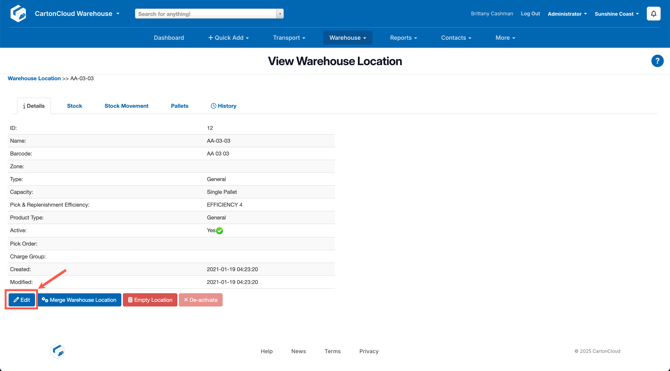
- Click Edit.
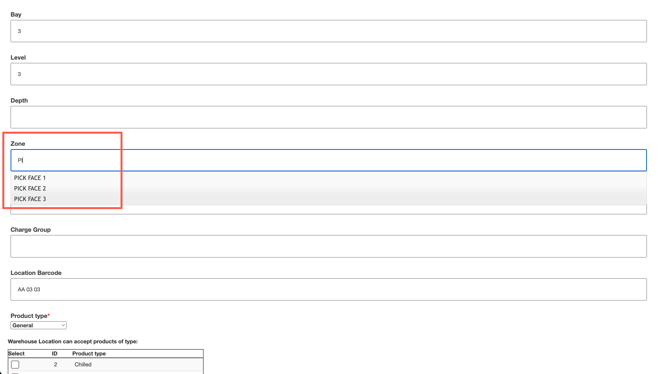
- Scroll down to Zone and type in the Warehouse Zone name you wish to create. Note, any other Warehouse Zones you have previously created will appear in the drop down as an option.
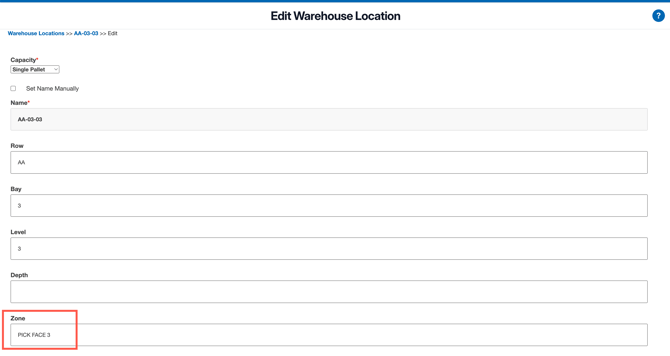
- Scroll down and click Save.
- The Warehouse Zone has now been created and will appear as an option when updating the Warehouse Zone for a Warehouse Location.
How to update a Warehouse Location with a Warehouse Zone
- Navigate to the Warehouse Locations page, Warehouse > Warehouse Locations.
- Select the Warehouse Location you wish to assign the new Warehouse Zone to.
- Click Edit.
- Scroll down to Zone and search for the Warehouse Zone you wish to assign to the location. Select the Zone you wish to assign.
- Scroll down and select Save.