Table of Contents
- Storage periods
- Configuring storage period settings
- Manually creating storage periods
- Storage charges
- Creating storage charges
- Split month storage billing
- How CartonCloud calculated storage charges
Storage periods
Storage Periods are the number of days at a time that you wish to charge storage for.
Storage Periods contain a start and end date and are created automatically within CartonCloud as soon as products are loaded into warehouse locations.
Configuring Storage Period Settings
You can configure the Storage Period start and end date by editing the relevant Rate Card. See Add/Edit Rate Card for more information.
Manually Creating Storage Periods
In some cases, you may want to manually create a Storage Period and then manually add it to an invoice. If you do, please read Creating a Storage Period and Adding Storage Periods to an Invoice for more information.
Storage charges
Storage Charges are applied to stock that is in the warehouse and allocated to a warehouse location. Storage Charges are automatically calculated and applied to invoices.
Creating Storage Charges
There are a variety of different methods which can be used to calculate storage charges. See Rate Card - Storage Charges for more information on how to create a Storage Charge and the different charging methods that can be utilised.
Storage Charges are always incurred for the full Storage Period for items. For example, if the defined Storage Period is 1 week and a pallet is only in the warehouse for 5 minutes it will still be charged 1 week of storage. Storage is never reduced for 'partial' periods.
Split Month Storage Billing
If you charge your customers monthly for storage you have the option of enabling split monthly storage billing. This allows you to offer a discounted rate for stock that comes in later in the first month of the stock being in the warehouse. You have the ability to choose where the month is split and how much of a discount you wish to offer your customer. For example, if you choose to split the month on the 15th of every month and a discount of 15%, for any stock that comes into a warehouse location after the 15th will receive a discounted rate of 15% off their storage rates.
These settings are set up at the Organisation Settings and Rate Card level. If configured from the Organisation Settings, the settings will be applied to any new Rate Card that is created. If configured at the Rate Card level, the settings will only be applicable for that specific Rate Card.
How CartonCloud calculated storage charges
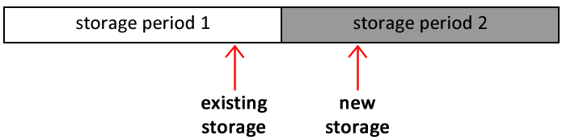
CartonCloud will combine existing storage and new storage to calculate the Invoice Periods Storage Charges.
Existing storage: is the stock that is already on hand at the start of the storage period (the date allocated is prior to the storage period start date).
New storage: all the inbound stock that falls within the storage period (date allocated is within the storage period range).
The following diagram shows two storage periods, Storage Period 1 and Storage Period 2.
Assuming we're calculating storage charges on Storage Period 2, the Purchase Order Products which were allocated to locations prior to Storage Period 2 are charged as Existing Storage (as they were already in the warehouse when the Storage Period began), and the Purchase Order Products allocated during Storage Period 2 are charged as New Storage.