
Table of Contents
- Purpose
- How to locate the stock (purchase order product) you wish to adjust
- Adjusting stock quantity
- Adjusting the stock expiry date and custom fields
- Update the stock status
Purpose
In CartonCloud, you can update and adjust stock on a Purchase Order. For example, you can adjust the quantity, edit the expiry date, batch number and change the status.
How to locate the stock (purchase order product) you wish to adjust
Before you can adjust the stock you will need to find the stock on the relevant Purchase Order. There are multiple ways in which you can do this: By Warehouse Location
This method only works if you know the warehouse location of the stock you wish to adjust.
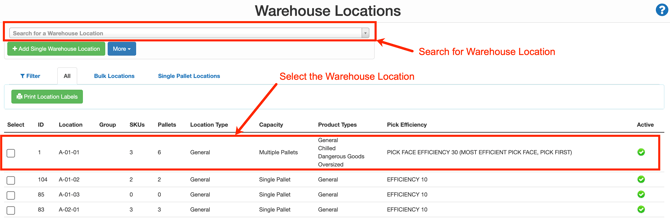
- Navigate to the Warehouse Locations page, Warehouse>Warehouse Locations.
- Select the relevant Warehouse Location or use the search bar to search for the Warehouse Location.
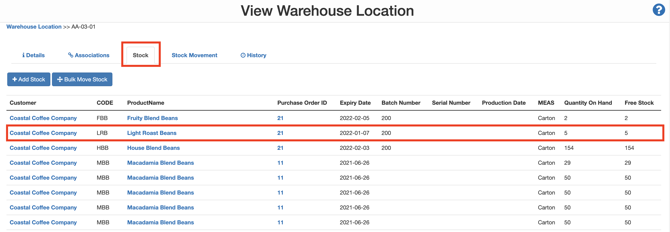
- Select the Stock tab.
- Select the relevant stock. Ensure you don't click any of the hyperlinks on the stock. You can click anywhere else on the product line.
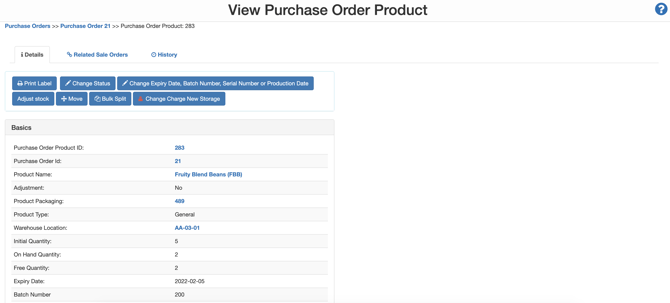
- You will now be on the individual stock page (Purchase Order Product). From here, you can adjust and edit the stock.

By Product
If you do not know the Purchase Order or Warehouse Location the stock is associated with, you can search for it by the Product.
- Navigate to the Products page, Warehouse>Products.
- Select the relevant Product.
- Navigate to the Stock tab.
- Select the relevant stock. Ensure you don't click any of the hyperlinks on the stock. You can click anywhere else on the product line.

- You will now be on the individual stock page (Purchase Order Product). From here, you can adjust and edit the stock.
By Purchase Order
- Navigate to the Purchase Order page, Warehouse>Purchase Orders.
- Select the relevant Purchase Order.
- Select the Products tab.
- Click View against the relevant product line.
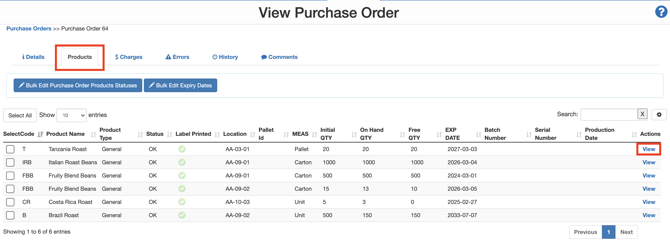
- You will now be on the individual stock page (Purchase Order Product). From here, you can adjust and edit the stock.

Adjusting stock quantity
You can make adjustments to the stock quantity. For more information on how to do this, please click here.
Adjusting the stock expiry date and custom fields
You can edit the stock's expiry date and any other custom fields set up for that customer. For more information on how to do this, please click here.
Update the stock status
You can change the status of stock. For more information on how to do this, please click here.