
Table of Contents
Purpose
Please note that if your CartonCloud account was created prior to 1 July 2019 the below functionality may not be available at this stage. If you would like to discuss migrating to the newer version of the CartonCloud TMS, please use CartonCloud Help and lodge a case with our Service Desk.
CartonCloud automatically calculates your consignment charges by using the Income Zone Sets, Rate Card and Transport Rates.
How to steps
To set up CartonCloud to automatically calculate consignment charges, please follow the below steps:
- Create Income Zone Sets
- Associate the Income Zone Set with the relevant Rate Card
- Create Transport Rates
The below diagram helps explain how CartonCloud uses Income Zone Sets, Rate Cards, and Transport Rates to automatically calculate consignment charges. 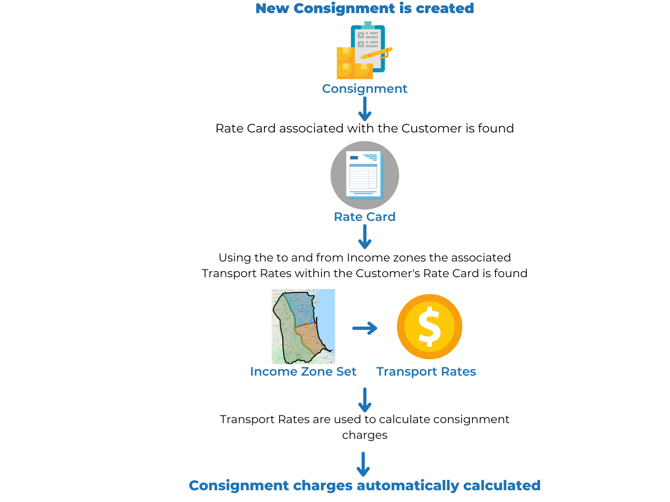
Income Zone Sets: Income Zone Sets contain the zones your operation uses for charging.
Rate Card: In CartonCloud the rates you charge your customers are controlled by a Rate Card. You can set Rate Cards to be used by just a single Customer, multiple Customers, or all your Customers, depending on how you want to charge for your services. To enable the automatic calculation of consignment charges the Customer's Rate Card must be associated with the applicable Income Zone Set.
Transport Rates: Transport Rates are the rates your customers will be charged for deliveries and are created within a Rate Card. CartonCloud applies these rates when automatically calculating consignment charges.
First Step: Setting up Income Zone Sets