
🔔 Note: this article is part of the CartonCloud Academy - WMS Charging Trail. This is the first article in the trail. 🎓
Welcome to the Warehouse Charging Trail! In this Trail, you will be guided through how to make the most of the CartonCloud warehouse charging system.
You will learn about the different types of charges you can apply, the different charging methods available and how all your rates are automatically calculated for you.
With CartonCloud’s warehouse rating system, you will never miss a handling charge or storage fee. CartonCloud automates storage rates and pick and putaway charges, creating a seamless and efficient charging experience for you and your customers.
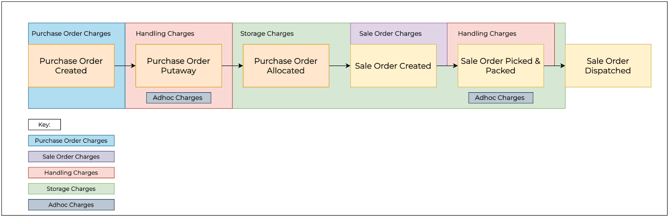
There are several different types of charges applicable for different stages of the warehouse process. These charges include:
- Sale Order Charges (example: an extra charge if the Sale Order is marked as urgent)
- Purchase Order Charges (example: flat fee for creating a Purchase Order)
- Handling Charges (example: an inbound charge applied to every Purchase Order)
- Storage Charges (example: a per pallet storage charge)
- Adhoc Charges (example: a charge applied for pallet wrapping that is only applied for applicable orders)
All of these charges are customisable and are created from within the Rate Card. The diagram below helps to demonstrate where each of these charges is applied in the warehouse process.
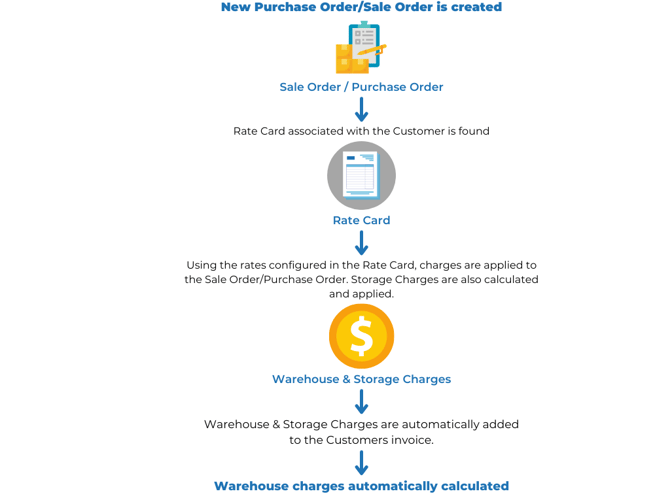
CartonCloud will use the Rate Card you have created for your customer to determine what and how rates are applied to orders. The rates are automatically calculated and then added to the customer’s invoice at the end of the invoice period (or during, depending on your invoice settings).
Nick from Coffee Warehousing and Distribution is excited to start using CartonCloud’s warehouse rating system. Coffee Warehousing and Distribution previously had to calculate all their Customer’s charges manually, with their rates kept in different excel sheets and documents that sometimes were hard to keep track of. Therefore, there were sometimes rate discrepancies and customers questioning their invoices. Now that Coffee Warehousing and Distribution are using CartonCloud all the rates will be automatically calculated and applied to customers' invoices, avoiding the need for manual administrative tasks and increasing rating accuracy.
Understanding Rate Cards
Rate Cards are fundamental to the warehouse rating system in CartonCloud. A Rate Card determines what prices your Customer will be charged for your Warehouse and/or Transport services. It also contains the settings that determine how the charges will be applied.
Every Customer in CartonCloud has a Rate Card associated with it. By default, the Rate Card associated will be the Default Rate Card; however, you will be able to change this.
Follow along with Brittany as she explains what a Rate Card is and how to create one in your CartonCloud account.
▶️ Follow along in the WMS Charging Trail...next up is Sale Order and Purchase Order Charges Explained 🎓