
Table of Contents
Purpose
To change the Customer that will be invoiced for a Consignment.
How to transfer the Consignment to a different Customer
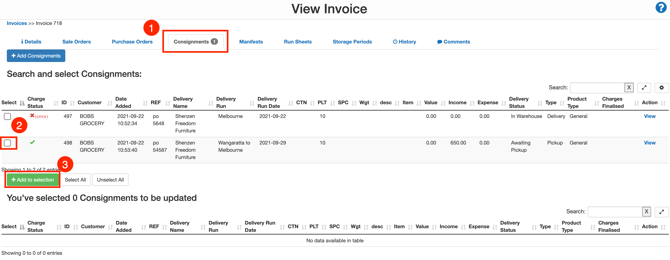
- Navigate to the Invoice page, More>Invoices.
- Select the relevant Invoice.
- Select the Consignments tab.
- Check the tick box next to the relevant Consignment.
- Click +Add to selection.
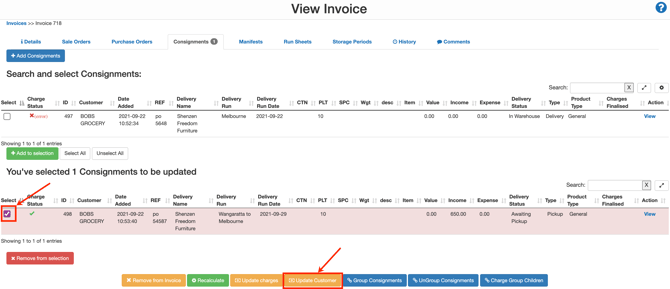
- Check the tick box against the Consignment in the selection window.
- Select Update Customer.
- Select the Customer you wish to move the Consignment to from the drop-down menu.
- Select the Invoice Option from the drop-down menu.
- Remove from Invoice: this will remove the Consignment from the invoice and leave it unassigned to an Invoice. This means you will have to assign the Consignment to a new invoice.
- Add to existing Invoice: this will add the Consignment to a current invoice. The invoice it is added to must be in Draft status and not be in leeching.
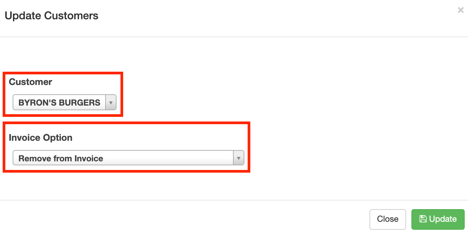
- Select Update.
If you selected the 'Remove from Invoice' option, you would need to ensure you add the Consignment to another invoice. To do this, please follow the steps here.