
Table of Contents
- Purpose
- Prerequisites
- Use Cases
- How Currency Is Determined
- Setting a Warehouse Currency
- Notes and Limitations
Purpose
Every CartonCloud organisation has a default currency, set in Organisation Settings, which determines the currency symbol shown on monetary values across the system. If your business operates warehouses in different countries or regions, you can now set a different currency for an individual warehouse. This is useful when a single CartonCloud account manages warehouses that each invoice customers in a different local currency.
This article explains how to set a currency for a warehouse, and how CartonCloud decides which currency symbol to display when a warehouse currency and an organisation default currency are both present.
Prerequisites
- You have Administrator access to CartonCloud.
- Your organisation's default currency is already configured. See the Organisation Settings article for how to set this.
- The warehouse you want to configure already exists in CartonCloud.
Use Cases
- A business with warehouses in the United Kingdom and Poland, operating under one organisation-level CartonCloud account with an Australian dollar default, sets the UK warehouse to GBP and the Polish warehouse to PLN.
- A business expanding into a new region sets up a new warehouse and configures its currency to match local invoicing requirements, without changing the organisation default used by its other warehouses.
How Currency Is Determined
CartonCloud resolves the currency symbol shown for a record using the following order:
- Warehouse currency — if a currency is set on the warehouse, it is used for all financial records tied to that warehouse (for example consignments, invoices, and charge descriptions).
- Organisation default currency — if no currency is set on the warehouse, the organisation's default currency applies.
Note: This setting only changes which currency symbol is displayed. It does not convert amounts between currencies, and it does not change how charges are calculated.
Setting a Warehouse Currency
- Type Warehouses in the Search for anything bar to navigate to the Warehouses page.
- Select Edit against the warehouse you want to configure.

- Locate the Currency field.
- Select a currency from the Currency drop-down list, or select Use organisation default to have the warehouse follow the organisation's default currency.
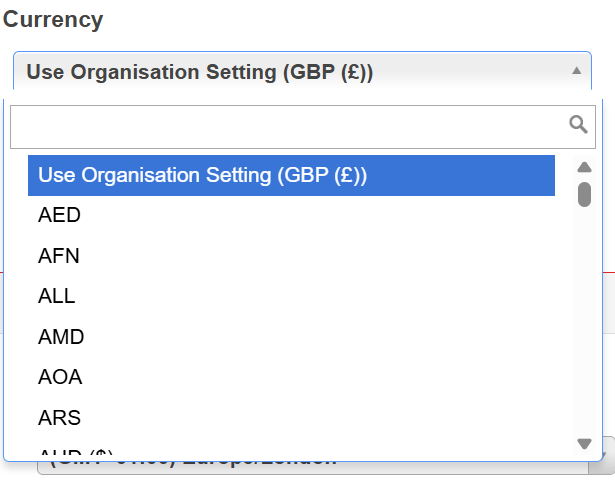
- Click Save.
The warehouse now displays monetary values using the selected currency's symbol for all records associated with that warehouse.
The table below shows examples of how a currency code maps to the symbol displayed in CartonCloud.
|
Currency |
Code |
Symbol Displayed |
|
British Pound |
GBP |
£ |
|
Euro |
EUR |
€ |
|
Polish Złoty |
PLN |
zł |
|
Australian Dollar |
AUD |
$ |
|
US Dollar |
USD |
$ |
Notes and Limitations
- Changing a warehouse's currency updates the symbol shown, not the underlying amount. No currency conversion is performed.
- Charge descriptions that were generated before the currency was changed keep their original symbol until the related charges are recalculated, or a new consignment is charged.
- Historical records, audit entries, and previously issued emails, PDFs, or downloads are not updated retrospectively.
- Each record uses the currency of the warehouse it belongs to. If you use multiple warehouses with different currencies, monetary values on a record always reflect that record's own warehouse — not the warehouse you currently have selected in your session.