
Table of Contents
Purpose
Directly Shippable Products are Products Unit of Measure flagged as being “directly shippable” and automatically create their own Consignment Item when using the Pack Screen and/or Auto-Generating Consignment Items.
Benefits
-
Faster packing workflows — eliminates the need to manually create consignment items or select Unit Of Measures when products ship in their original packaging.
-
Better visibility of pack structure — each unit is automatically allocated its own consignment item, providing a clear packing structure.
-
Flexible control — pin, lock, and unlock icons (or barcodes) give you control over how scanned items are grouped, allowing for customisation without slowing down the process.
-
Reduced packing errors — product dimensions and weights are automatically pulled from the Product Packaging settings, ensuring consistency across Consignments.
Use Cases
When scanned in the Pack Screen, Directly Shippable items automatically create their own consignment item with dimensions and weights pulled directly from the product record. This is ideal for items that ship in their original packaging, such as TVs, boxed appliances, or palletised goods as it eliminates the need to manually re-enter dimensions and weight data. When working with auto-generated consignment items, directly shippable products will generate their own individual consignment items in the same way.
Prequisites
-
Understand the Pack Screen and the related requirements. See here for more information.
-
Enable the Directly Shippable Product from the Unit of Measure set up:
-
Navigate to Warehouse > Products.
-
Select the relevant Product.
-
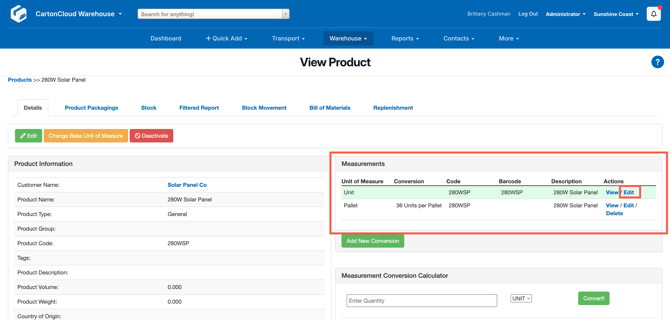
Navigate to the Measurements section.
-
Click Edit against the relevant Unit of Measure.
-
-
Tick Directly Shippable.
-
Update the Length, Width, Height, and Gross Weight (optional but recommended).
-
Ensure the UOM is linked to a Transport Product. See here for instructions.
Directly Shippable Products and the Pack Screen
When a Product Unit of Measure is flagged as being Directly Shippable, it enables additional features during packing via the Pack Screen:
-
A carton icon is shown beside the Unit of Measure on the Pack Screen to highlight that it is a Directly Shippable Product.
-
Clicking or scanning the Directly Shippable Product automatically creates a Consignment Item for each unit.
-
Weights and dimensions from the linked Product Unit of Measure and Transport Product are applied.
-
By default, the weight of the Directly Shippable Product is applied to the Consignment Item; however, by selecting the weight icon next to the weight, the Transport Product weight can be added.
| Logic | Behaviour |
| Unlocked | Other products can be added to the Consignment Item. |
| Locked | When a product is scanned, it creates its own Consignment Item with no other products able to be added to the Consignment Item. This behaviour is selected by default for Directly Shippable Products. |
| Pinned | When selected, additional products will be added to the Consignment Item when scanned, even if it is a Directly Shippable Product. This is most commonly used if you are packing onto pallets. |
The above logic (unlock, lock, pin) is available via Action Barcdoes:
-
Unlock consignment item - CCACT004
-
Lock consignment item - CCACT005
-
Pin consignment item - CCACT003
See here for a printer-friendly version.