Table of Contents
Purpose
If you need to credit your customer, you can add a negative amount to the invoice, which will act as credit and deduct the amount from the invoice.
How to add a credit amount to an invoice
Note that the invoice must be in Draft status. If it is not in Draft status, you will need to revert the invoice status; please click here for steps on how to do this.
- Navigate to the relevant Invoice, More>Invoices>select the applicable Invoice.
-
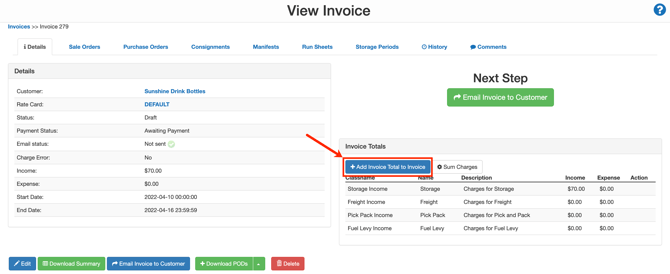
Select +Add Invoice Total to Invoice.
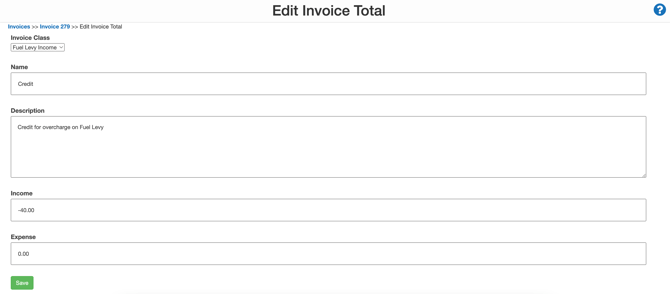
- Select the Invoice Class the credit relates to.
-
Name the charge Credit.
-
Enter a description of what the credit relates to.
- Enter the credit amount in the Income. Ensure the value leads with a minus sign '-'.
- Click Save.
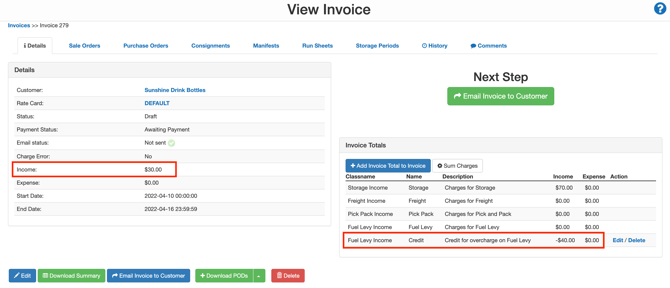
- The credit amount will appear on the invoice and be deducted from the invoice total.