
Table of Contents
- Purpose
- Benefits
- Solution 1 - automatic email through the driver set up
- Solution 2 - manually email the runsheet from the drivers page
Purpose
To email your Runsheets to the allocated Driver either automatically on a daily week-day basis or manually at ad-hoc times.
Benefits
-
Ensures your Drivers have a copy of the correct Run Sheet.
- Reduces admin time of having to download each Run Sheet and then email it to each Driver.
- Eliminates the need to print the Run Sheet.
Solution 1 - Automatic email through the Driver set up
You can set up your Drivers to receive their Run Sheets via email every day at 19:00 AEDT.
The time in which the email is sent each day is not configurable.
Steps to enable the Driver to receive their Run Sheet daily:
-
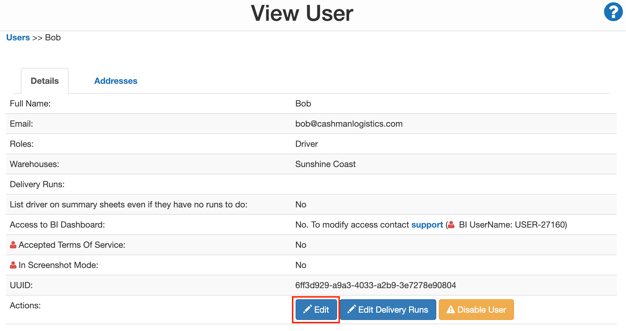
Navigate to the Users page by selecting Contacts>Users.
- Select the applicable Driver.
- Select the Edit button at the bottom of the screen.
-
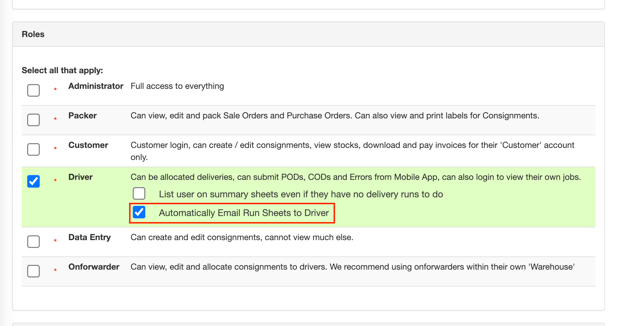
Scroll down to the Roles heading and within the Driver role section tick Automatically Email Run Sheets to Driver.
-
The Run Sheet will now be emailed to the email address set up for that Driver every day from Monday through to Friday at 19:00 AEDT.
Solution 2 - Manually email the Runsheet from the Drivers page
-
Navigate to the Drivers pages by selecting Contacts>Drivers.
-
Select the applicable Driver.
-
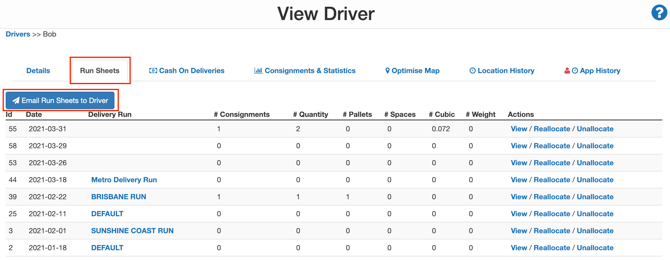
Select the Run Sheets tab.
-
Click the Email Run Sheets to Driver button at the top of the screen.
-
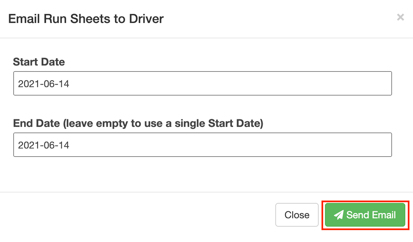
Select the date ranges for the Run Sheets you wish to include and then click the Send Email button.
-
The email will then be sent to the email address set up for that Driver.