
Table of Contents
- Purpose
- Dashboard quickview
- Manual vs automated
- Automation report explained
- How to improve automation levels
Purpose
The Automation Report is a powerful tool to allow you easily check which of your Customer's are entering their orders manually or having your staff enter their orders manually. Dashboard Quickview
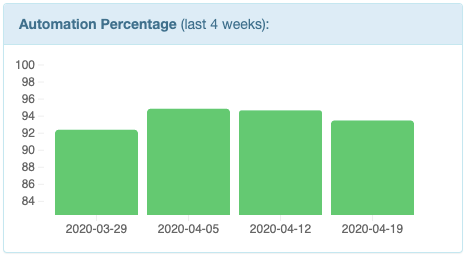
You can see a quick breakdown of the report from the Dashboard screen. If you don't see this widget then simply enable it through the dashboard.
Manual vs Automated
The following table explains the various data-entry types and whether they are considered manual or automated.
|
Automated / Manual |
Name |
Description |
|
Manual |
Manual (Admin) |
Jobs manually keyed in by your staff. |
|
Manual |
Manual (Customer) |
Jobs manually keyed in by your customers. (user logged in as "Customer") |
|
Automated |
|
Jobs imported via email. |
|
Automated |
FTP |
Jobs imported via FTP. |
|
Automated |
Web Upload |
Jobs imported through a file via Web Upload (includes those uploaded by customers) |
|
Automated |
API |
Jobs imported through the CartonCloud API |
|
Automated |
From Sale Order |
Consignments created automatically from a Sale Order |
Automation Report Explained
Clicking on any of the bars will open the Automation Report.
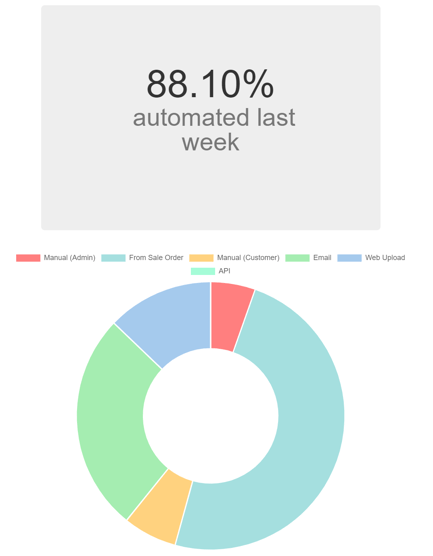
The report provides you with a visualisation of how jobs were created last week, categorising them into the way in which the data was entered.
Week on week comparison
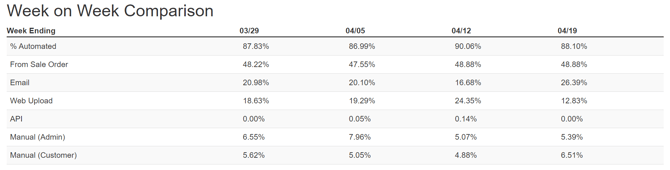
The report also includes a week by week comparison on the level of automation within your operation and the break down of where data is coming from into your system. This provides further insight on the data entry efficiency of your operation over a period of time going back up to a month.
Which customers are costing the most time
To assist you in knowing where to focus your automation efforts, the report lists up to 10 of your most manual customers.
Note: You can access more details across all customers through CartonCloud BI

How to improve automation levels
We're here to help you get data entry automated. So simply get in contact with our integrations team and we can work with you to get things automated.