Table of Contents
- Purpose
- What is Rapid Sale Order Packing?
- Considerations when using Rapid Sale Order Packing
- How to enable/disable Rapid Sale Order Packing
Purpose
The CartonCloud mobile app allows the user to enable Rapid Sale Order Packing to increase the speed of confirming products while packing products.
What is Rapid Sale Order Packing?
With Rapid Sale Order Packing enabled, on confirming a product line the changes are not immediately submitted to the server but initially stored locally. Consequently, the Sale Order is not being reloaded every time a product line is being confirmed, reducing the wait time between confirmations. This allows packers to dramatically increase the speed of packing.
The Sale Order progress only gets submitted to the server when either selecting Finish Packing or exiting the Sale Order through the back button and selecting Save Packing Progress.
Considerations when using Rapid Sale Order Packing
Because the packing progress is only submitted to the server when Finishing Packing (or Saving Packing Progress on exiting the Sale Order view) when Rapid Packing is enabled, issues may arise when multiple packers are working on the same order simultaneously. In this circumstance, to avoid double-picking and synchronisation issues, we recommend disabling Rapid Packing.
Comparison between regular Sale Order Packing and Rapid Sale Order Packing:
How to enable/disable Rapid Sale Order Packing
Please ensure you are in the Picking mode before accessing the settings.
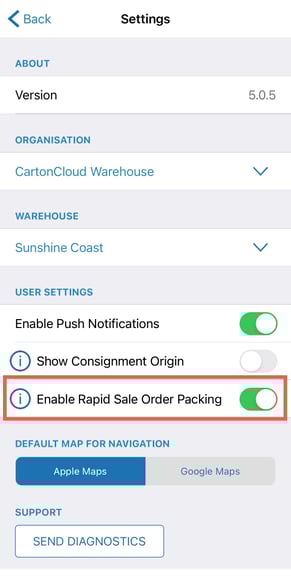
Rapid Packing is enabled by default but can easily be disabled in the Settings.
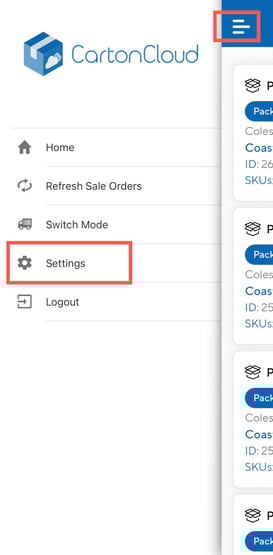
- Navigate to Settings, select the menu navigation icon and select Settings.
- Slide the Enable Rapid Sale Order Packing toggle to green to enable it and the other way to disable it.