
Table of Contents
- Purpose
- Use case
- Fields that can be updated
- How to set up the parser
- How to upload the parser
- Workflow
- Settings to configure
Purpose
Using the Consignment Item Import Parser or Manifest With Consignment Items Parser, you can update existing Consignments with changes made since the original Consignment was imported.
Use case
For example, if you use another TMS to build Run Sheets and allocate jobs, you can use the Parser to import the Consignments (that already exist in CartonCloud) into CartonCloud with the allocation information from the other systems. CartonCloud will then create the Run Sheets and allocation to match, therefore, removing the need for repeated manual work, and Drivers can immediately perform the deliveries as scheduled.
Using the update functionality, any changes made in the other TMS can be easily replicated in CartonCloud using the Parser.
Fields that can be updated
-
Service Type
-
Addresses
-
Consignment Data Custom Fields
-
Consignment Items (all fields including Code, Description, Item Custom Fields and item properties – Qty, Pal, Cub, Weight, Space, L, W, H.)
-
Driver
-
Run Sheet
Please note this Parser will only work for Delivery, Duplicate, Pickup and Point to Point Consignments.
This Parser does NOT support Return and Pickup + Delivery Consignments.
How to set up the Parser
Please contact our Integrations Team - via CartonCloud Help to set up your Parser.
Please use the below workflows and setting descriptions to determine which workflow you wish to use in your operations, this will assist our team to ensure the correct Parser is set up for your account.
How to upload the Parser
To upload the Parser you can do so from the Consignments page in CartonCloud. Please see Importing Consignments for more information.
Workflow
You can follow several different workflows when using the Consignment Item Import Parser or the Manifest With Consignment Items Parser to update existing Consignments or create new Consignments. Using the below workflows and setting descriptions, you can determine what workflow you wish to utilise in your operations.
Our Support/Integrations team will help ensure the correct settings are configured for your workflow; however, you can use the below as a guide when deciding what workflow you would like your Parser to follow.
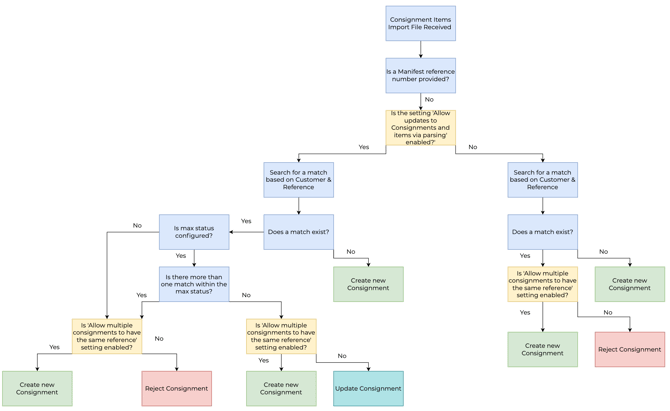
Consignment Item Import Parser Workflow
If a Manifest reference number is NOT provided on the file
-
The Manifest reference does not need to be included in the import file.
-
Regardless if a Consignment is on a Manifest or not, the Consignment can be updated using the Consignment Item Import Parser; however, the 'Allow updates to Consignments and items via parsing' MUST be enabled.
The max status function is controlled by our Integrations/Support team. If you are unsure if you wish to include this function in your workflow please reach out to the integrations team via CartonCloud Help
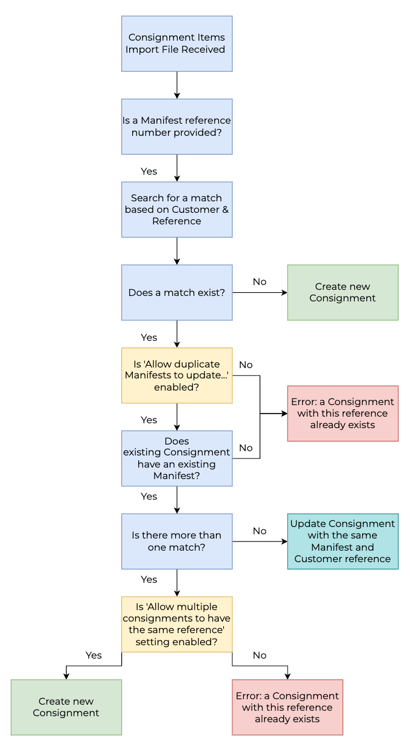
Manifest with Consignments Items Parser
If a Manifest reference number IS provided on the file
-
The Consignment must already be on a Manifest to be updated.
-
The customer and Manifest reference on the parser file must have the same customer reference and Manifest reference as the Consignment you wish to update.
-
You must include the Manifest reference on the file.
Settings to configure
Our Support/Integrations team will help ensure the correct settings are configured for your workflow; however, you can use the below as a guide when deciding what workflow you would like your Parser to follow.
To navigate to the settings:
- Navigate to the Customer Settings, Contacts>Customers and click Edit against the relevant Customer.
- Select the Transport Management tab.
| Setting | Enabled | Disabled | Use Case |
|
Allow updates to Consignments and items via parsing (only applies to the Consignment Items Import Parser) |
Consignments either on a Manifest (the Manifest reference does not need to be included on the import file) or not a Manifest will be updated if the customer reference on the Consignment matches a Consignment already in CartonCloud. This will only apply if 'Allow multiple consignments to have the same reference' and 'Skip consignments with references that already exist' is DISABLED. The Parser must also use the max status functionality for the setting to work and for the Consignments to be updated. |
Consignments can not be updated. The only way Consignments can be updated with this setting disabled is using the Manifest with Consignments Items Parser, and the Consignment must be on a Manifest. |
If you want to update existing Consignments on a Manifest, but the Manifest reference is not provided on the Parser file, or the Consignment is not on a Manifest, you need to ensure this setting is ENABLED. If you are using the max status function on the Parser, you need to ensure this setting is ENABLED to update Consignments. |
|
Allow duplicate Manifests to update existing Consignments and Items until the Manifest has been updated to any In-Warehouse status (only applies to the Manifest with Consignment Items Parser) |
You can update existing Consignments when parsing a file that contains the same Manifest reference. Note, the Manifest reference must be included in the file for this setting to work. | You are NOT able to parse a file containing duplicate Consignment references. | If you want to update existing Consignments on a Manifest, you must ensure this setting is ENABLED. You also need to ensure the import file contains the Manifest reference; otherwise, the setting will not apply. |
| Allow multiple consignments to have the same reference | You can add Consignments with duplicate references. |
You are NOT able to add Consignments with duplicate references. Depending on other settings configured, the Consignment with the duplicate reference will either be created into a new Consignment, or the existing Consignment will be updated. |
If you want to update existing Consignments, you need to ensure this setting is DISABLED. |
| Skip consignments with references that already exist | Consignments with references that already exist in CartonCloud will be skipped and not included in the import. |
Consignments with references that already exist in CartonCloud will be included in the import. Depending on other settings configured, the Consignment with the duplicate reference will either be created into a new Consignment, or the existing Consignment will be updated. |
If you want to update existing Consignments, you need to ensure this setting is DISABLED. Note, the 'Allow multiple Consignments to have the same reference' setting can not be enabled whilst the 'Skip consignments with references that already exist' is enabled. This is because these two settings contradict each other, and thus only one of the settings can be enabled. |