
Table of Contents
Purpose
When completing the packing step of a Split Pick and Pack Wave Pick you can pack orders by the product unit of measure barcode. This enables a more efficient packing process, especially for e-commerce workflows with most orders being single items.
Prerequisites
- Product Unit of Measure barcodes are set up against the product.
- The Product Unit of Measure barcodes are available to scan on the items.
Workflow
A workflow that can assist the picking and packing efficiency for single-item orders is to do the following:
- Create a Split Pick and Pack Wave Pick containing single-item orders to maximise the product cross-over between orders.
- Pick all of the orders in one go.
- Bring the orders back to the packing station and then rather than working through order-by-order, the packer can select an item, scan it and then pack it.
- As each item (Product Unit of Measure barcode) is scanned, this selects an unpacked order from the wave that contains that item. The Sale Order that is selected is based on a priority order of:
- Sale Order with 1 quantity of the item
- Sale Order with any quantity of the item
- The packer can then pack and print the shipping label and dispatch the order.
How to steps
- From the Switch Mode page select Wave Picking.
- Select the relevant Wave Pick.
- Select Pick and complete the picking following the Wave Pick - Picking process.
- Once picking is completed you can move onto the packing stage.

- Scan the Product Unit of Measure barcode. The Sale Order with that product will be selected and you can complete the pack by selecting Finish Packing.
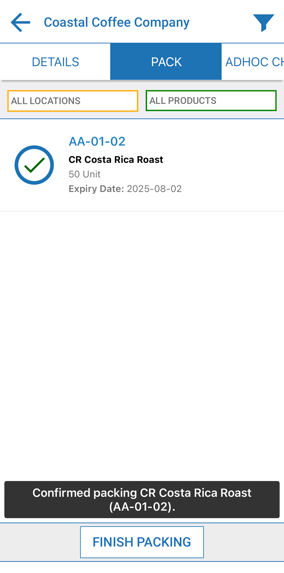
- Continue scanning the Product Unit of Measure barcodes to select and pack all of the orders on the Wave.
