
Table of Contents
- Purpose
- Use cases
- Considerations
- How to create a Warehouse Location Charge Group
- Warehouse Location Charge Group and Storage Charges
Purpose
Warehouse Locations can be grouped into Charge Groups. All locations with the same Charge Group will be charged as a single location.
Use cases
- This is useful if you have an area of small shelves that you wish to generate a single charge for.
Considerations
- Warehouse Location Charge Group storage charging will only apply if using Per Location storage charge method.
- It is best practice to ensure the locations that are grouped are a single pallet capacity.
- If you are wanting the charges to be grouped for 'New Storage' you will need to set the Max Number of New Charges Per Location to 1 in the Rate Card (within the Storage Tab), otherwise grouping will only be applied for Existing Storage.
- It is best practice to utilise the Charge Product Type Option of Warehouse Location (against the Rate Card) and to ensure each Warehouse Location in the group has the same Product Type.
- If Warehouse Locations in the same group have different Product Types, the Product Type with the highest rate will be applied.
How to create a Warehouse Location Charge Group
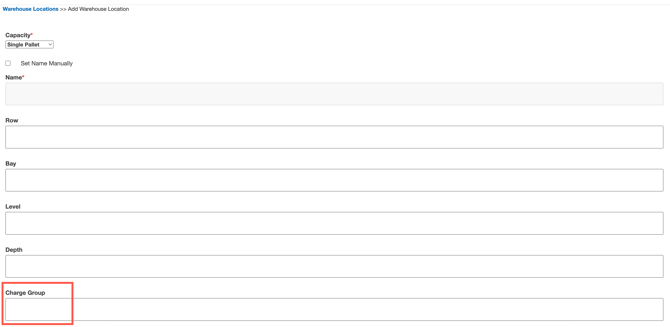
- When creating a Warehouse Location (following the Adding Warehouse Locations process), fill in the Warehouse Location Charge Group field with the group name.
- Apply this same name to each location you wish to be in the Warehouse Location Charge Group.
Warehouse Location Charge Group and Storage Charges
Storage charges for Warehouse Location Charge Groups are created in the same way as normal storage charges are following this process - View Rate Card - Storage Charges.
Please ensure you read the above considerations before creating your storage charges for Warehouse Location Charge Groups.