
Table of Contents
- What are handling charges?
- How to add handling charges
- Charge behaviour and aggregation
- Charge structure
What are handling charges
Handling Charges are fees that are applied to incoming stock and outgoing stock from your warehouse. Handling Charges are applied automatically upon creating a Purchase Order and Sale Order.
Inbound Handling Charges will apply to Purchase Orders, and Outbound Handling Charges will apply to Sale Orders.
You will need to select the Picking and Putaway Charge Method from within the Rate Card. See the Sale Order and Purchase Order Handling Fee Algorithm page for more information regarding each charging method.
How to add Handling Charges
-
Within the relevant Rate Card, select the Handling Charges tab.
-
Select +Add Handling Charge.
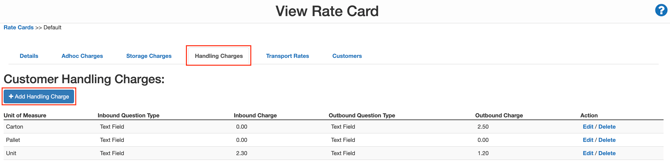
-
Select the Unit of Measure that the charge will apply to.
If you have applied the Default (Scale to Highest Unit Of Measure) Charge Method for either Picking or Putaway you have the option to select a Charge Behaviour.
-
Select the Charge Behaviour from the drop-down menu. The Charge Behaviour will dictate what Product Unit of Measure is used to calculate the charge and allows you to specify what Unit of Measure you wish to charge in. For example, this enables you to apply a case pick charge for a bottle pick.
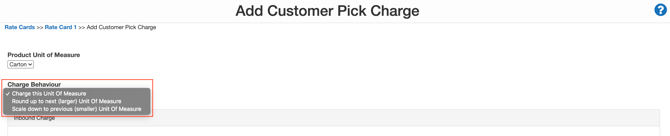
Note, if you selected Round up to next (larger) Unit of Measure or Round down to previous (smaller) Unit of Measure, you will not need to enter a rate; however, you will need to ensure the Product Unit of Measure you are either rounding up or down to has a rate against it.
-
Select the Charge Structure for both the Inbound (Purchase Order) and Outbound (Sale Order) Charge. The Charge Structure is the charging scheme you would like to apply to the charge.
-
Enter the rate.
-
Select the Save button at the bottom of the screen.
You will now see the handling charge be applied when creating Purchase Orders or Sale Orders. Next time you create a record of these types, which you expect to have a handling charge, you should see it popular under the Charges Tab inside the Item Charge Databox.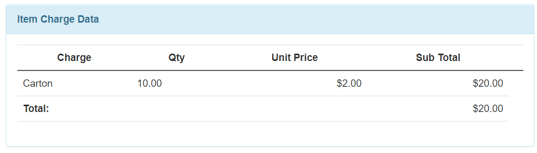
In this example, a $2 handling fee per carton has been applied to a Purchase Order containing 10 cartons.
Charge Behaviour & Aggregation
If using the Default (Scale to Highest Unit Of Measure) Charge Method for either Picking or Putaway you will need to select the Charge Behaviour and the Aggregation option.
Note, the Aggregation option is set up against the Product and/or the Rate Card.
For the following examples, assume we have a product in which:
6 bottles = 1 case
Charge Behaviour = "Charge this unit of measure"
In this example, assume we have Bottles configured to Charge this unit of measure
|
Location |
Pick / Putaway Quantity |
No aggregation (default) |
Aggregate by SKU by location |
Aggregate |
|
AA-01-01 |
5 bottles |
Charge 5 Bottles |
Combine 7 bottles together (5+2) which converts to 1 Bottle + 1 Case Charge 1 Case + 1 Bottle |
Combine 12 bottles together (5+2+5), which converts to 2 cases. Charge 2 Cases |
|
AA-01-01 |
2 bottles |
Charge 2 Bottles |
|
|
| AA-01-04 |
5 bottles |
Charge 5 Bottles |
Charge 5 Bottles |
|
|
Total Charge |
|
12 Bottles |
6 Bottles + 1 Case |
2 Cases |
Charge Behaviour: "Round up to next (larger) Unit of Measure"
In this example, assume we have Bottles configured to Round up to next (larger) Unit of Measure
When using this Charge Behaviour you need to ensure you have a Pick Charge set up for the Unit of Measure you are rounding up to.
|
Location |
Pick / Putaway Quantity |
No aggregation (default) |
Aggregate by SKU by Location |
Aggregate by SKU across the entire warehouse |
|
AA-01-01 |
5 bottles |
Round up 5 bottles to 1 case Charge 1 Case |
Combine 7 bottles together (5+2) which converts to 1 Bottle + 1 Case Round up 1 bottle + 1 case to 2 cases Charge 2 cases |
Combine 12 bottles together (5+2+5), which converts to 2 cases. Charge 2 Cases |
| AA-01-01 |
2 bottles |
Round up 2 bottles to 1 case Charge 1 Case |
Round up 5 bottles to 1 case Charge 1 case |
|
|
AA-01-04 |
5 bottles |
Round up 5 bottles to 1 case Charge 1 Case |
|
|
|
Total Charge |
|
3 Cases |
3 cases |
2 Cases |
Charge Behaviour: "Round down to previous (smaller) Unit of Measure"
In this example, assume we have Cases configured to Round down to previous (smaller) Unit of Measure
When using this Charge Behaviour you need to ensure you have a Pick Charge set up for the Unit of Measure you are rounding down to.
|
Location |
Pick / Putaway Quantity |
No aggregation (default) |
Aggregate by SKU by location |
Aggregate |
|
AA-01-01 |
5 bottles |
Charge 5 bottles |
Combine 7 bottles together (5+2) which converts to 1 Bottle + 1 Case Round down 1 bottle + 1 case to 7 bottles Charge 7 bottles |
Combine 12 bottles together (5+2+5), which converts to 2 cases. Round down 2 cases to 12 bottles Charge 12 bottles |
|
AA-01-01 |
2 bottles |
Charge 2 bottles |
|
|
| AA-01-04 |
5 bottles |
Charge 5 bottles |
Charge 5 Bottles |
|
|
Total Charge |
|
12 bottles |
12 bottles |
12 bottles |
Charge Structure
|
Charge Structure |
Description |
Examples |
|
Text Field |
A flat rate per unit of measure |
Example: Per unit charge $0.50 |
|
Sliding Scale |
Banded rates for variations in quantity |
Example: Per 1-10 units charge $0.50 / For 10+ units charge $0.40 |