
Table of Contents
What are Adhoc Charges
Adhoc charges make it possible to load in customised charges for things like Demurrage (Waiting Time), Hand Unload, Labelling, and other work that is performed which is not charged automatically through the system. These are charges you can choose to add-on while creating each of the documents listed below as tabs. Adhoc charges are created across the entire organisation (using the Adhoc charge setup page) and then adjusted (rates set) within each of your rate cards (using this page). These prices can then be further tweaked within the Sale Orders, Purchase Orders, Consignments and Run Sheets that use them.
It is important to know that setting up an Adhoc charge doesn't automatically apply it when that service/work is performed, instead, it will appear as an optional charge on the page you specify when creating the Adhoc charge.
We recommend that you only use Adhoc charges which:
-
Cannot be automated by CartonCloud
-
Are charged out to Customers more than once a week (otherwise, it's easier just to enter a manual charge for infrequently billed services)
How to create Adhoc Charges
To create ad-hoc charges, you can use the Adhoc Charge Setup page or click Add New Charge on the Adhoc Charges page in the Rate Card.
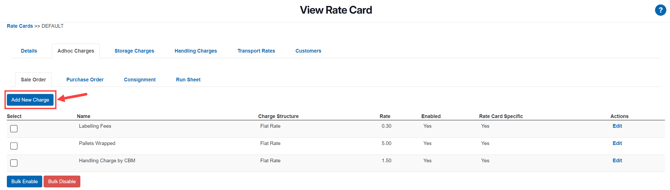
Adhoc Charges tab on the Rate Card
From this page, it is possible to create, enable, disable and edit already existing Adhocs charges, this means you can adjust an Adhoc rate specifically for this Rate Card.
To edit an Adhoc charge:
- Click the Edit button, then charge the fields as required. Remember, changes to these fields will only apply to the Rate Card you are currently viewing.
| Name | The name you want the Adhoc charge to appear as. |
| Rate | The rate you want to charge (for this rate card only) |
| Description Template | To fill out the charge description so that the detail calculation appears on the invoice, a template is used to automatically insert things such as Quantity, Unit Price, and Total. This can be customised to match what you're charging. |
| Fuel Levy | Apply the rate cards fuel levy to the ad hoc charge. |
| Enabled / Disabled | To turn the Adhoc charge you are editing on or off for the rate card. |
-
Click Save and your changes will be applied.
To add a new Adhoc Charge:
-
Click Add New Charge.
-
You will be directed to the Adhoc Charge Setup page. Creating an Adhoc Charge here will create a default Adhoc Charge that will not only apply to that Rate Card.
-
See Adhoc Charge Setup for more information.