
Table of Contents
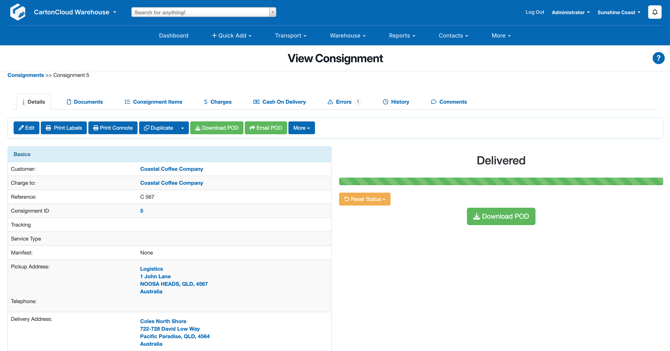
Details
From the Details tab, there is Consignment information and available actions.
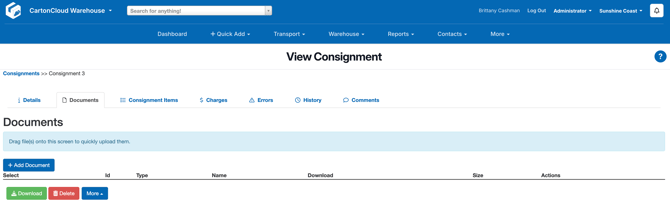
Documents
Documents can be uploaded and added to the Consignment.
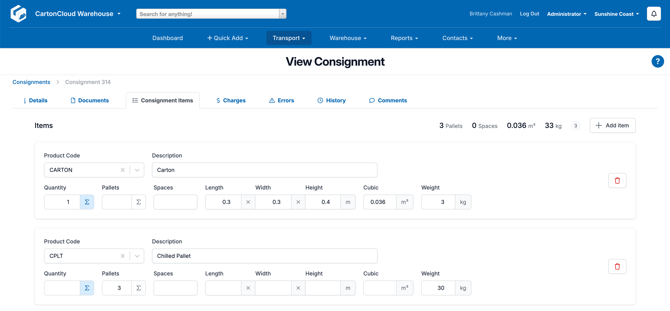
Consignment Items
The Consignment Items are the items on the Consignment. These items are represented by Transport Products, such as a pallet or a carton. From here you can see what items are associated with the Consignment, the quantity and item specifications such as weight and cubic.
Consignment Items can be edited, deleted and added from this view.
Charges
The charges associated with the Consignment. This view provides a breakdown of the charges and allows you to investigate any charging issues.
| Button / Field | Explanation |
| Details | |
| Finalize Charges | To prevent the charges from being modified |
| Assigned to Invoice | The invoice the Consignment is associated with |
| Rate Card (Income) | The Rate Card being applied to the Consignment |
| Charge Errors | If there are any charge errors they will be listed here |
| Income | The income dollar amount associated with the Consignment |
| Income Rate Zones | The Income Rate Zones applied to the Consignment |
| Adhoc Charge Data | Any Adhoc charges will appear here. Charges can be added or removed here. |
| Charges | |
| +Add Income Charge | See Applying Manual Charges with 'Add Income Charge' for more information. |
| Automatically Calculate Income Charges | This will calculate the income charges for the Consignment |
Errors
From here Consignment Errors can be created and viewed. See Consignment Errors for more information.
History
To view the history of the Consignment.
Comments
To view and add comments to the Consignment. See Adding a comment to a Consignment for more information.