
Table of Contents
- What is the difference between POP labels and Pallet labels
- Purchase Order Product (POP) labels
- Pallet labels
What is the difference between Purchase Order Product labels and Pallet labels
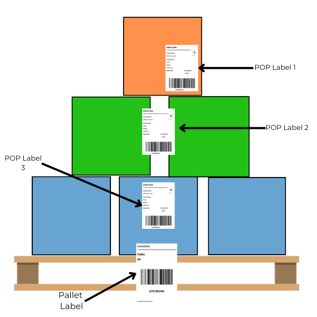
Purchase Order Product (POP) labels are the labels assigned to the Purchase Order Products on a Purchase Order when stock first arrives to the warehouse. As this stock moves the POP ID and label will change. On the other hand, a pallet label will persist as the stock moves around the warehouse. The pallet label is assigned to an entire pallet of stock (multiple products) rather than a particular item of stock of the same SKU and can be utilised to move stock around the warehouse.
Purchase Order Product (POP) labels
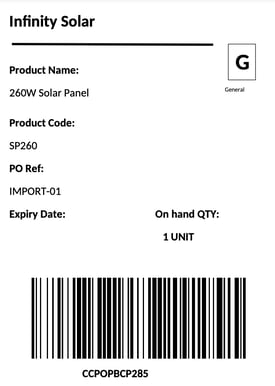
Purchase Order Product (POP) labels represent a particular stock quantity of a certain item. The POP ID (which is included in the POP label) is assigned when stock first arrives to the warehouse and as stock moves through the warehouse it will change. The POP ID will change so that the stock can be traced to see where that particular stock was at any one time. POP labels are useful as you can add product information to the label and it contains important details such as when the stock arrived, however, the POP label can become confusing at times as it changes when the stock moves. Therefore, it is recommended that Pallet labels are used in conjunction with POP labels and the Pallet label be utilised to move stock around the warehouse.
Example POP label:
Pallet labels
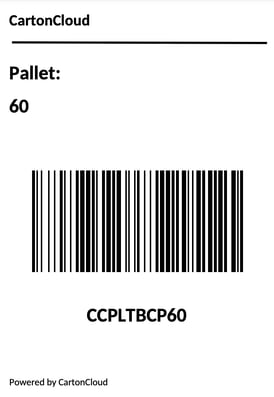
A Pallet label represents an entire pallet of stock regardless of how many different SKUs and POPs are on the pallet. The Pallet label will persist even as the stock is moved in the warehouse and can be used to scan pallets into locations. Pallet labels are extremely useful as they persist throughout the order stock lifecycle and only need to be printed once. It is suggested that you use Pallet labels to move stock around the warehouse not POP labels.
Example Pallet label:
See Pallet Handling for more information.