Table of Contents
What are Tags in CartonCloud
Tags are a flexible system that allow you to categorise, search and manage your data in CartonCloud more easily. Product Tags are the first entity in CartonCloud to have this feature; however, in the future, more entities in CartonCloud will have the Tags functionality.
Product Tags
Product Tags allow you to add one or more tags to a Product directly from within the edit product screen. Any newly created Product Tag is automatically added to the pre-defined list, making it available for future use.
Product Tags are visible:
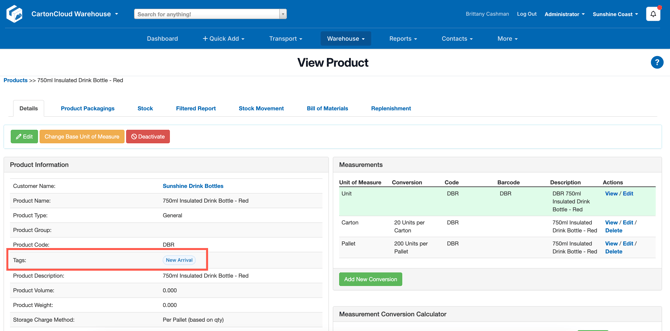
- On the product view page for easy reference.
- In the Customer Stock Report with an optional Tags column, it displays a comma-separated list of tags for each product.
- On the Product export. This allows you to add Product Tags via the Product export/import function.
Product Tag Use Cases:
- Tags can be used to categorise Products by attributes such as 'Perishable', 'Fragile', and 'Hazardous' for easier filtering in reports.
- Your Customers may require custom tags such as supplier names for easier tracking of sourcing and stock issues.
- To identify Products for seasonal sales or marketing campaigns such as 'Christmas', 'Clearance', 'New Arrival'.
- To track where Products are in their product lifecycles, such as 'Discontinued' or 'End-of-life'.
- To report on product insights such as 'High Turnover' or 'Slow Moving'.
How to add a Product Tag
- Navigate to the Products page, Warehouse > Products.
- Select the relevant Product and click Edit.
- Within the Tags field, start typing the Tag you wish to add to the Product. If it is an existing Tag, you will be able to select it from the drop-down. If it is a new Tag, click the Add button that appears on the drop-down once you have finished typing the new Tag.
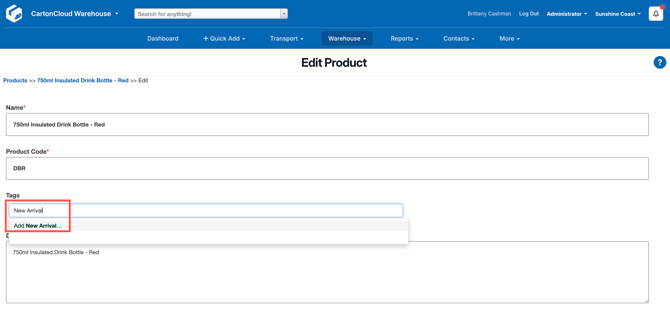
- The Tag has now been created and will be available for future use.
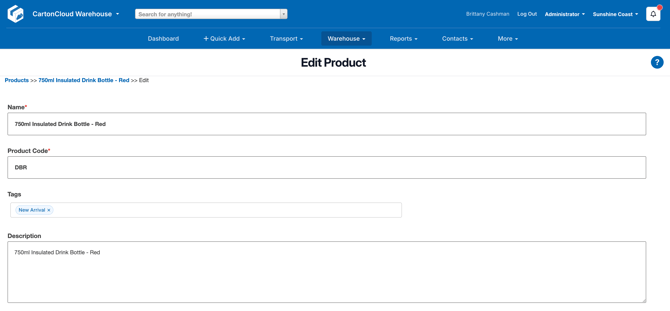
- Scroll down and select Save.
- The Tag will now appear on the View Product page.