
Table of Contents
- Purpose
- Expense charge calculation
- How the customer charges are selected
- Supplier rates for specific customers
Purpose
Please note that if your CartonCloud account was created after 1 July 2019, you will not have access to Carriers and Drivers Expenses / Suppliers. Please reach out to our Service Desk team via CartonCloud Help if you have any questions.
Income charges in CartonCloud, are calculated using the "Customer Charges" associated with the Customer. However, if Receiver Pays Freight & A2IC Mapping is enabled, the Customer Charge card used will come from the "Charge Customer".
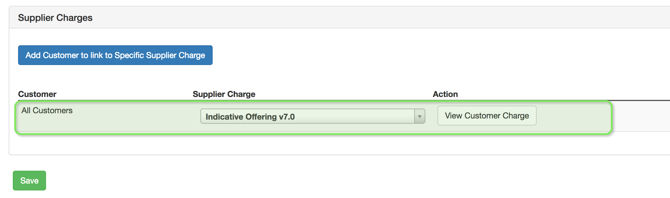
Expense rates, however, have another layer of control, whereby the Customer Charges can be specified within the Supplier. In addition, customer-supplier specific rates can be configured.
For example Customer A can have different expense rates to Customer B when a specific Supplier is used.
Expense charge calculation
While Calculating the Expense charge for consignment, the charges are calculated on the basis of Driver/Carrier/Warehouse Mapping.
Driver Mapping: If Driver is associated to the consignment then, the supplier which is linked to the driver gets associated to the consignment along with its charges.
Carrier Mapping: If no driver is associated to the consignment then, the charges are based on the carrier linked to the consignment.
Warehouse Mapping: If no driver/carrier mapping is associated then, the charges are based on the warehouse.
Note: When no Rate Cards are found appropriate error message "Expense: No rates found for Supplier: 'xxxx' with Rate Zone: 'xxxx' (clear)" is displayed.
How the "Customer Charges" are selected
When CartonCloud is calculating the Expense Rates for a job, the following logic applies: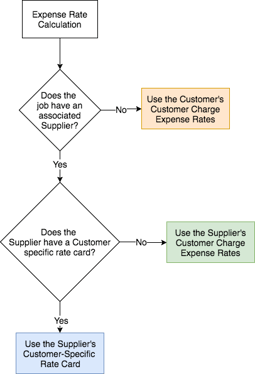
Supplier rates for specific customers
Suppliers have the ability to charge different rates depending on the customer they're doing the work for. Say for example you have 3 Parties, Customer A, Customer B and Supplier X. For delivering Customer A's consignments, Supplier X charges $10 per pallet. However, for delivering Customer B's consginments, Supplier X charges $15 per pallet. This can be easily configured by creating individual charge cards where required, and linking them to the Supplier.
By default, Supplier charges will apply to all customers. However, these rates can be overwritten for specific customers.
From the Edit Supplier Screen, simply click "Add Customer to link to Specific Supplier Charge".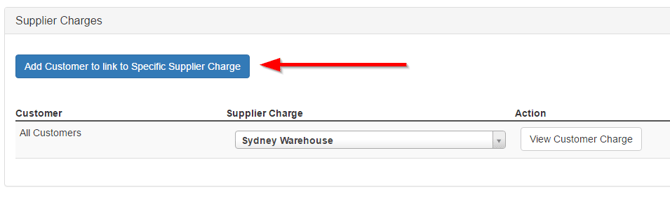
Then select the customer who you want to charge differently through billing: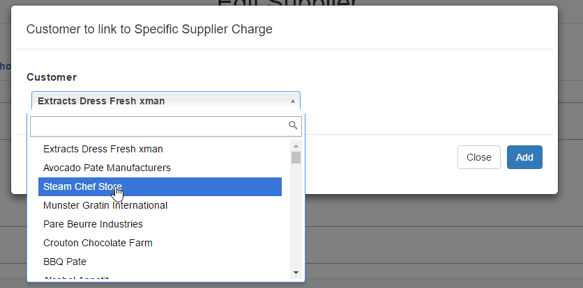
Then, select the appropriate Supplier Charge to use, and click "Save".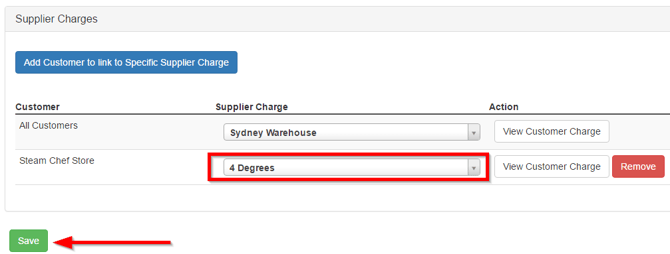
Now, all jobs for Steam Chef Store will be charged out using the 4 Degrees rate card.