Table of Contents
What is Split Month Billing
Split Month Billing allows you to offer a discounted rate for stock that comes in later in the first month of the stock being in the warehouse or for stock that leaves the warehouse early in its last month of storage. You have the ability to choose where the month is split and how much of a discount you wish to offer your customer.
For example, if you choose to split the month on the 15th of every month and a discount of 15%, for any stock that comes into a warehouse location late after the 15th will receive a discounted rate of 15% off their storage rates. Or if you choose to split the month on the 10th of every month and a discount of 5% for any stock that leaves early in its last month of storage, any stock that leaves before the 10th of its last month of storage will receive a discounted rate of 5% off their storage rates.
Prerequisites
-
Must be charging your customers monthly for storage
-
Must be using the following storage charge methods for each type of split month billing option:
-
First month (allocation) - only applicable if using per pallet or per location storage charge method
-
Last month (depletion) - only applicable if using per pallet or per location storage charge method. This option is currently in beta release only. If you would like access to this beta release please reach out to the team via CartonCloud Help .
-
Both first month (allocation) and last month (depletion) - only applicable if using per pallet or per location storage charge method. This option is currently in beta release only. If you would like access to this beta release please reach out to the team via CartonCloud Help .
-
How to apply Split Month Billing
Split Month Billing can be configured from within the Rate Card and at the Organisation Settings level. If configured at the Organisation Settings, the settings will be automatically applied to any new rate card created. If the settings are configured at the rate card level, they will only apply to that particular rate card.
Organisation Settings
-
Navigate to the Organisation Settings, More > Organisation Settings.
-
Select the Invoice tab.
-
Scroll down to the Storage heading.
-
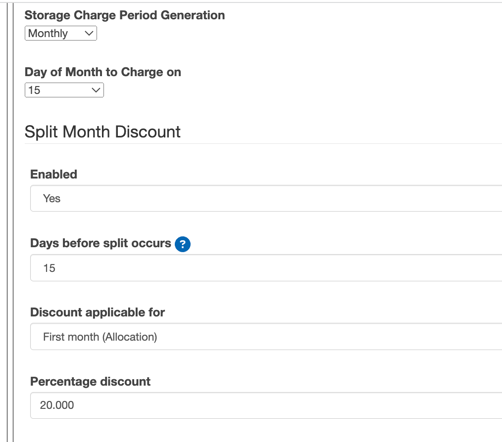
Ensure the Storage Charge Period Generation is set to Monthly.
-
Select Yes from the Enabled drop down.
-
Days before split occurs: the number of days into the storage period after which the split should occur. This will define when stock is considered in the split period and the discount is applied. For example, if you set the days to 20, any stock that comes in after 20 days of the month will be considered in the second split period and receive the percentage discount off the storage rates.
-
Discount applied for:
-
First month (allocation) - this will be applied for stock that arrives late in the first month. (only applicable if using per pallet or per location storage charge method)
-
Last month (depletion) - this will be applied for stock that leaves early in its last month of storage (only applicable if using per location storage charge method)
-
Both First month (allocation) and last month (depletion) - both discounts will be applied. This means a discount will be given to stock that arrives late in the first month and to stock that leaves early in its last month of storage. (only applicable if using per location storage charge method)
-
-
Percentage discount: the percentage discounted from the storage rates. The percentage is only applied to stock that is allocated to a warehouse location post the day the split occurs.
-
Scroll down and select Save.
Rate Card
-
Navigate to the relevant Rate Card, More>Rate Card.
-
Select Edit against the Rate Card.
-
Scroll down to Storage Period Generation.
-
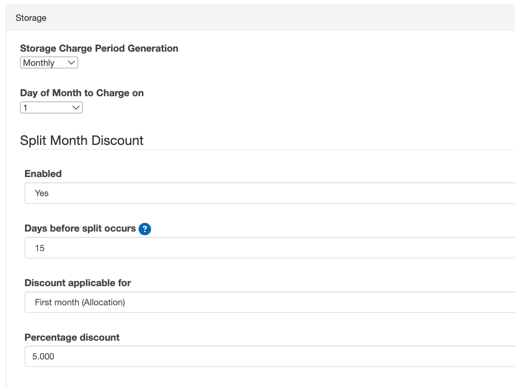
For Storage Period Generation select Monthly.
-
Fill in the following fields:
-
Day of month to charge on: day of the month to charge on
-
Split Month Discount: select enabled
-
Days before split occurs: the number of days into the storage period after which the split should occur. This will define when stock is considered in the split period and the discount is applied. For example, if you set the days to 20, any stock that comes in after 20 days of the month will be considered in the second split period and receive the percentage discount off the storage rates.
-
Discount applied for:
-
First month (allocation) - this will be applied for stock that arrives late in the first month. (only applicable if using per pallet or per location storage charge method)
-
Last month (depletion) - this will be applied for stock that leaves early in its last month of storage (only applicable if using per pallet or per location storage charge method)
-
Both First month (allocation) and last month (depletion) - both discounts will be applied. This means a discount will be given to stock that arrives late in the first month and to stock that leaves early in its last month of storage. (only applicable if using per pallet or per location storage charge method)
-
-
Percentage discount: the percentage discounted from the storage rates. The percentage is only applied to stock that is allocated to a warehouse location post the day the split occurs.
-
Scroll down and select Save.