
Table of Contents
- What is a Shipment?
- Shipment Custom Fields
- How to create a Shipment
- How to associate a Container and Purchase Order to a Shipment
What is a Shipment
A Shipment in CartonCloud is an order before it reaches your warehouse. You can associate Purchase Orders and Containers with Shipments.
Shipment Custom Fields
Shipment Custom Fields allow you to record custom information against each Shipment. To create a Shipment Custom Field follow the instructions here - Introduction to Custom Field. It is recommended you include the below when creating your Shipment Custom Fields:
- Reference number
- Estimated arrival date
How to create a Shipment
- Navigate to the Shipment page by typing Shipments into the Search for anything bar.
- Click +Add in the top left corner.
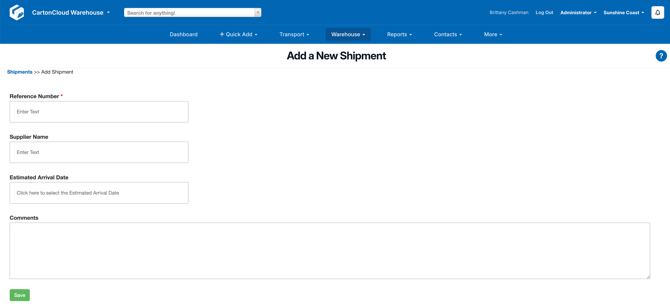
- Enter the Shipment details and click Save.
How to associate a Container and/or Purchase Order to the Container
- Navigate to the relevant Shipment.
- Click the Containers and/or Purchase Order tab.
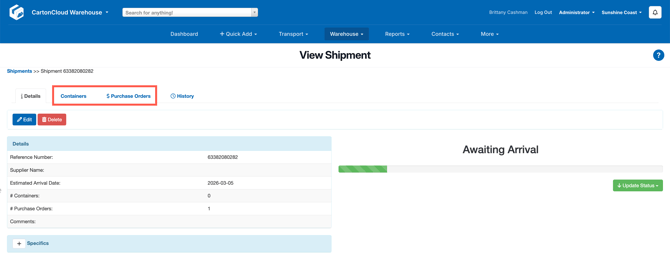
- Click +Add Container or +Add Purchase Order.
- Click Go on the search and tick the relevant Container/Purchase Order to associate with the Shipment.
- Scroll down and select Add Selected Purchase Orders / Add Selected Containers.