Table of Contents
Purpose
When viewing the list of Sale Orders in the CartonCloud mobile app, a Run Sheet filter can be applied, allowing the user to only see the Sale Orders associated with the selected Run Sheet. Filter Access
To access the Run Sheet filter, select the filter (funnel) button in the top bar while in the Sale Order list.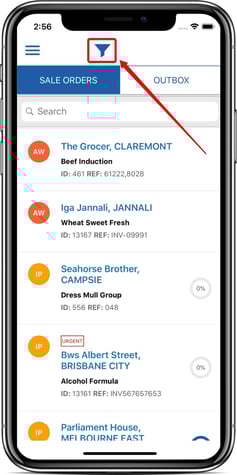
Filter Options
Once the Run Sheet filter has been activated, a drop down field will be enabled, displaying the filter options currently available (including Run Sheet).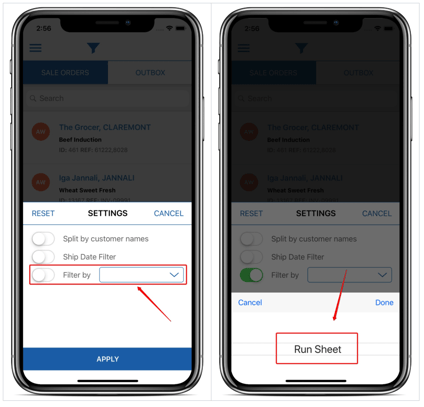
On selecting the Run Sheet option, a second drop down field is made available, displaying a list of Run Sheets that the user can filter by. This list is based on all Sale Orders that are currently in In Progress or Awaiting Pick & Pack status and the Run Sheets that are associated with these Sale Orders.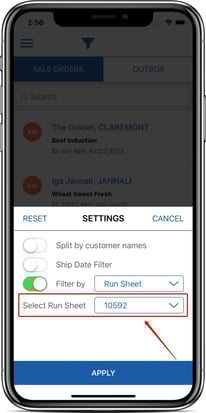
Applied Filter
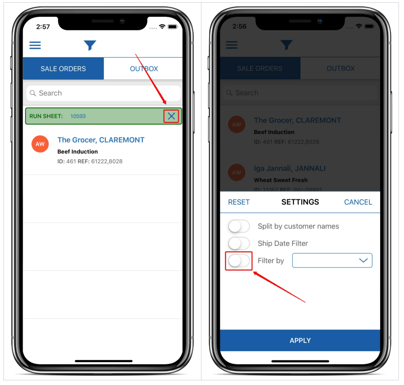
Once a Run Sheet filter has been applied, a banner will be displayed at the top of the Sale Order list, highlighting the Run Sheet filter that has been applied.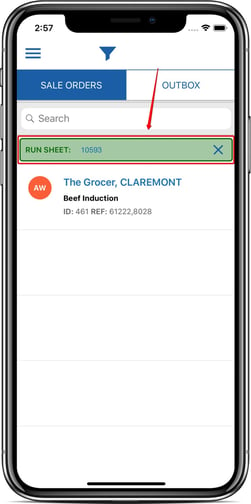
The applied filter can be cancelled by either tapping the X button on the banner, or by once again opening the filter view and either adjusting the filter or switching off the Run Sheet filter altogether.