
Table of Contents
- Purpose
- How to reset your CartonCloud password from the Login Page
- How to reset your CartonCloud password from your Dashboard
Purpose
If you have forgotten your CartonCloud login password, you can reset it from the CartonCloud login page or from your Dashboard.
How to reset your CartonCloud password from the Login Page
- From the CartonCloud login screen, click I forgot my password.
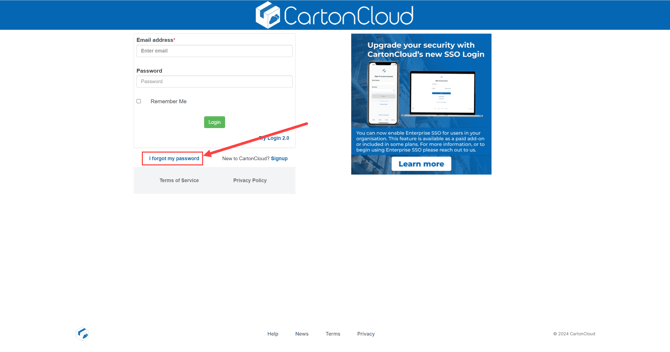
- Enter your email address and you will receive an email prompted you to reset your password.
How to reset your CartonCloud password from your Dashboard
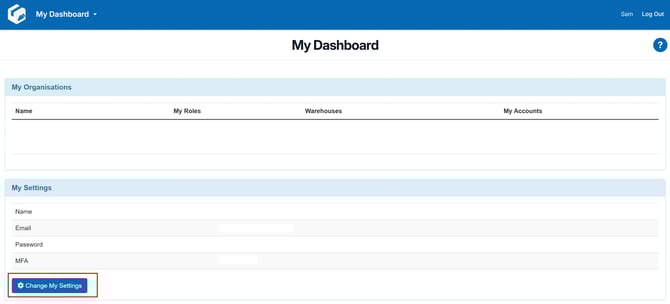
- When logged in, navigate to your Dashboard by opening the menu arrow beside your account name.

- Click "Change My Settings"
- Check the "Change Password" box, this will open the password fields.
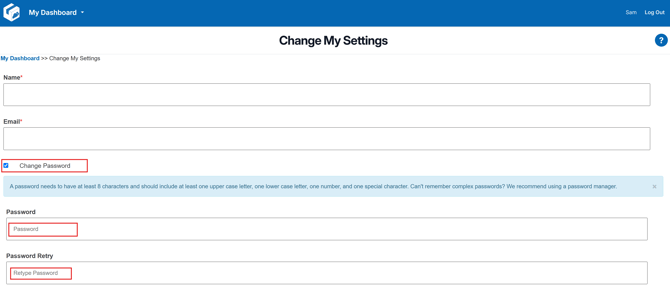
- Enter new matching password in both fields, save.
Remember: A password needs to have at least 8 characters and should include at least one upper case letter, one lower case letter, one number, and one special character. Can't remember complex passwords? We recommend using a password manager.