
Table of Contents
Purpose
A Rate Card Cascade is a second Rate Card utilised when there are no matching rates in the first Rate Card.
Example
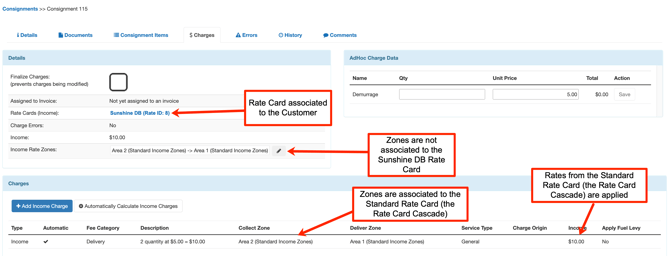
- You have a Consignment for the Customer Sunshine Drink Bottles, and Sunshine Drink Bottles is associated with the Sunshine DB Rate Card, and the Rate Card Cascade is the Standard Rate Card.
- Sunshine Drink Bottles move a large amount of freight from regional zones; therefore, they have special rates for these zones. These zones and rates are set up on the Sunshine DB Rate Card.
- The Consignment is moving from Area 2 to Area 1. These are standard metro zones and are NOT set up on the customer-specific Rate Card (Sunshine DB Rate Card); therefore, no rates on this Rate Card will apply for the Consignment.
- CartonCloud will use the rates from the Standard Rate Card as it is the Rate Card Cascade and has rates set up for the applicable zones.
Benefits
- You only have to maintain one set of standard rates (only need to update one Rate Card).
- Easier to set up Customer Rate Cards (don't need to copy all of the standard rates across, only need to include the customer-specific rates).
- Flexibility with how you charge your Customers.
How to set up Rate Card Cascade
- Navigate to the Rate Cards page, More>Rate Cards.
- Select the relevant Rate Card.
- Select the Transport Rates tab.
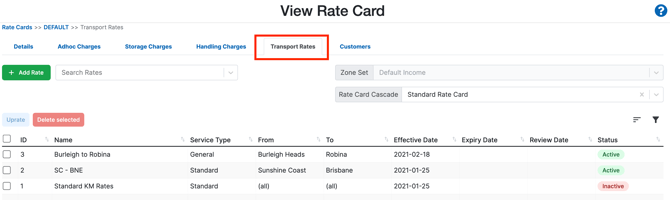
- Select the drop-down arrow against the Rate Card Cascade.
- Select the Rate Card you wish to apply as the Rate Card Cascade.
- Click Save.