
Table of Contents
Purpose
The Purchase Order Report provides a list of all Purchase Orders and their related data, including custom fields for a specified date range.
Accessing the purchase order report
- Navigate to the Purchase Order Report, Reports>Purchase Order Report.
- Select if you wish to order the report by Date Added or Arrival Date.
- Date Added: the date the order was added into CartonCloud
- Arrival Date: the date it arrived to the warehouse
- Select the Purchase Order History Status you wish to show on the report.
- All (Verified, Allocated)
- Verified: Purchase Orders which have arrived but has not yet been allocated to warehouse location.
- Allocated: Purchase Orders that have arrived and been located to a warehouse location.
- Select the From and To date.
- Click Show Report (will show on the web page) or Export Excel (will download into an excel format and you will be notified when it is ready via the bell icon in the top right of the screen)
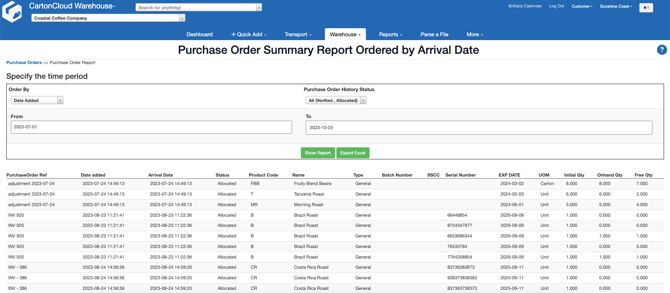
Example Report: