
Table of Contents
- What are product statuses?
- Modifying product statuses
- Product status to decide whether to charge for storage
- Problem Stock Report
- Changing the product status on a Sale Order
What are product statuses?
Product Statuses are used to label stock as Damaged, Missing, Lost, Quarantine etc. You can also configure Stock with a particular Product Status to count toward Storage Charges or not. For example, stock with a Missing Status probably shouldn't be charged storage (you don't have it after all!)
Modifying product statuses
To access the Product Statuses page:
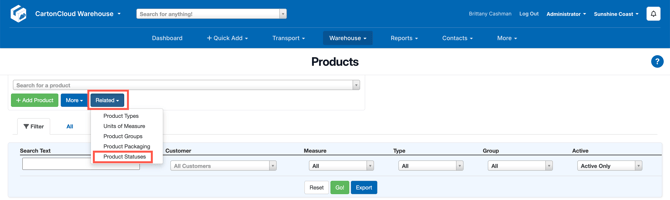
- Navigate to Warehouse > Products.
- From the Related drop down menu select Product Stauses.
Once there, you'll see that some Product Statuses have a locked icon, these are used internally by CartonCloud and cannot be modified or deleted. 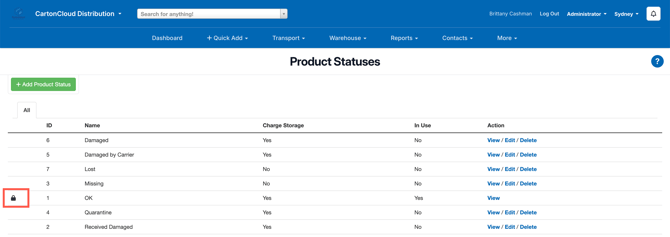
For all the others, however, you can edit them, and you can delete them if they're not in use by any Purchase Order Products.
How to create a Product Status
-
Navigate to the Product Statuses page by typing Product Statuses into the Search for anything bar.
-
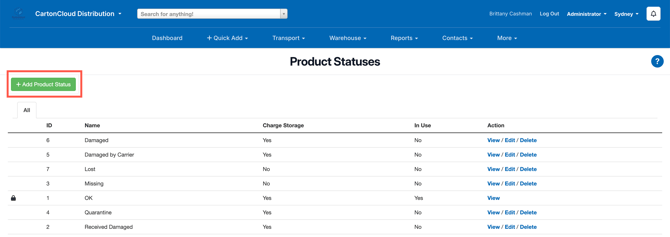
Click +Add Product Status.
-
Enter the Name of the status and click Save.
Product status to decide whether to charge for storage
Charge storage is an option you can control on Product Statuses. If you set this to Yes (default), then stock that has that status will be charged storage.
If you set it to No, then stock with that status will not be charged storage. For example, you may not want to charge for stock that has the status Missing.
Problem Stock Report
All stock with a product status other than OK will appear on the Problem Stock Report , which can be generated by Customers who are logged in to CartonCloud.
Changing the Product Status on a Sale Order
If you change the status of a stock to a status other than OK on an existing Sale Order in a status less than Packed, that particular stock will be removed from the order and replaced by stock that is in a status of OK.