Table of Contents
What is a Problem Stock Report
The Problem Stock Report will generate a list of any stock in the warehouse which has a status other than OK. CartonCloud Administrators can create their own product statuses to easily identify the status of stock. However, by default the included product stases are:
- OK
- Damaged
- Damaged by Carrier
- Lost
- Missing
- Quarantine
- Received Damaged
How to run a Problem Stock Report
- Select Reports > Problem Stock Report.
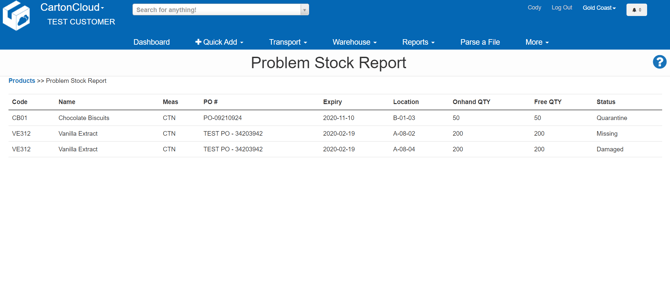
- Automatically a list of stock that is in a product status other than OK will show on the screen.
- In the example report below we can see that there are 50 units of Chocolate Biscuit in a Warehouse location which currently have the status set to "Quarantine". There is also 200 Units of Vanilla Extract with the status "Missing" and a further 200 units of Vanilla Extract with the status "Damaged".