
Table of Contents
Purpose
This article explains how to customise the fields displayed in the Recipient Details section of the Record POD screen within the CartonCloud Mobile App. By default, this section only includes First Name and Last Name fields. You can modify this to capture additional details like Time In, Time Out, or Temperature, depending on your delivery requirements.
Prerequisites
-
Admin access to the CartonCloud Web App
-
Driver must be using the CartonCloud Mobile App
-
The driver must log out and back in for changes to apply, unless the app is updated
Benefits
-
Capture relevant delivery or recipient data for compliance, customer service, or audit purposes
-
Ensure accurate record-keeping at the point of delivery
-
Adapt POD fields to meet industry-specific requirements
Use Cases
-
Cold chain logistics where temperature must be recorded
-
High-security deliveries where recipient identification is critical
-
Time-tracking for Time In and Time Out to monitor delivery efficiency
How-To Steps
To customise the fields shown on the Record POD screen in the CartonCloud Mobile App:
-
Navigate to Organisation Settings by typing Organisation Settings into the Search for Anything field.
-
In the Organisation Settings page, click the Mobile App tab.
-
Locate the section for Consignment Custom Fields.
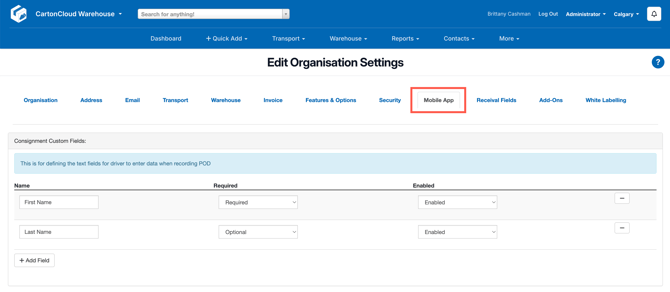
- Select + Add Field and fill in the below information:
-
Name — This is the label shown in the Mobile App (e.g. First Name, Temperature).
-
Required — Tick this if drivers must enter a value before completing POD.
-
Enabled — Untick this to hide the field without deleting it.
-
-
After making your changes, click Save.
Ask your drivers to log out and back in to the CartonCloud Mobile App so the changes take effect.
- Once applied, your customised fields will appear on the Record POD screen during delivery confirmations in the Mobile App.