
Table of Contents
Purpose
If you wish to pick Sale Orders by Delivery Run, it is possible to create a Wave Pick.
How to pick by Delivery Run by creating a Wave Pick
- Navigate to the Wave Pick page, Warehouse>Wave Picks.
- Click +Add Wave Pick.

- Select Customer as the Wave Pick Type.
- Select the Customer you wish to run the Wave Pick for.
- Select Split Pick and Pack Processes as the Wave Pick Process Type.
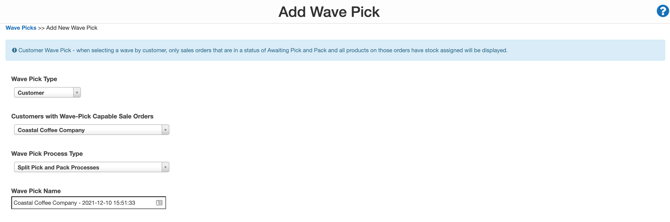
- Name the Wave Pick.
You may want to name it the Delivery Run.
- Order the Sale Orders by Expected Delivery Run by clicking the title Expected Delivery Run.
- Use the tick box to select the orders you wish to add to the Wave Pick. Because they are ordered by Expected Delivery, Run, you will be able to add all Sale Orders for the one Delivery Run to the Wave Pick.
- Scroll down to the bottom and click Begin Wave Pick.
You can repeat this process for each Delivery Run.