
If you're just getting set up with CartonCloud and don't have everything manifested by your Customers, it is still possible for the drivers to get electronic PODs in the field.
Drivers can photograph signed invoices using their mobile and these are lodged in the CartonCloud system as PODs which you then allocate to a consignment.
On the App, the driver simply presses the Camera button, takes a photo and then presses 'Confirm' to have it sent to CartonCloud.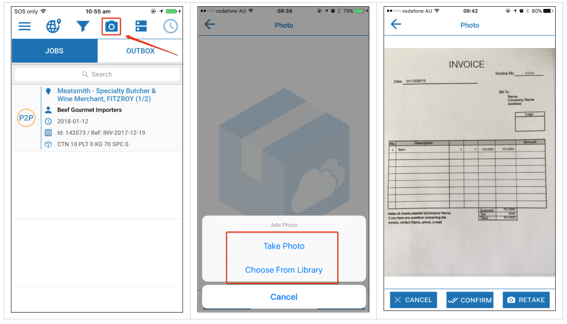
Within CartonCloud you can see when these Invoice Photos have been sent in from the dashboard by looking at
"Unassigned Consignment Invoices / PODs".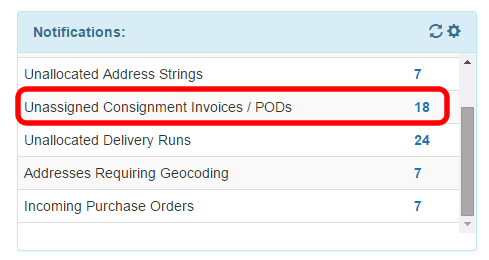
Simply click the number (ie: 18), and this will take you straight to the list of Unassigned Consignment Invoices.
From there, simply click Assign next to one of the Proof of Deliveries you want.

From there, you can search for an existing Consignment, or if it doesn't already exist, click 'Add New Consignment'.
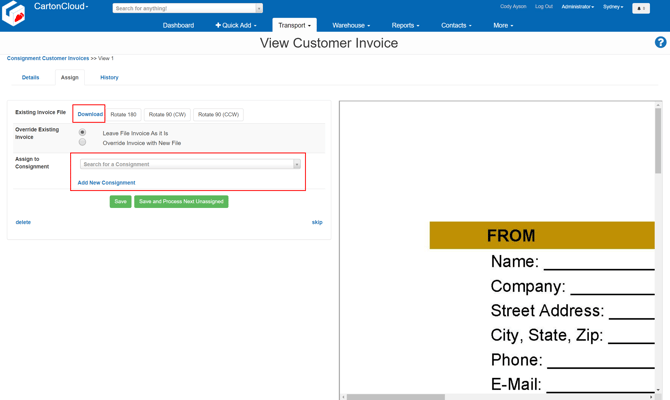
Once the consignment has been added you'll be able to choose it from the box, and then click either "Save" or "Save and Process Next Unassigned" (if you have more to process).
The photograph will be saved as the POD