
Table of Contents
- What is a Parser
- Benefits of using Parsers
- Use cases for Parsers
- Types of Parsers
- How to parse a file
What is a Parser
Parsers are able to read data and then import the data into CartonCloud in a format the system can understand. Using the data, the Parser can create or update a record in CartonCloud, for example, a Sale Order or Consignment.
Parsers are usually in the format of an excel spreadsheet (xlsx, csv etc.), and the document will contain all the data pertaining to the orders. There are three ways in which Parsers can be uploaded to CartonCloud:
- Web application upload - from the ‘Parse a file’ page on the web app, the parser file can be uploaded directly to CartonCloud.
- Email - the parser file can be uploaded via emailing the file to a set email address. Once emailed in, the orders will be automatically created in CartonCloud.
- File Transfer Protocol (FTP) - for this method, please contact the CartonCloud team for more information.
Benefits of using Parsers
- Eliminates repetitive data entry
- Reduces time spent creating/sending through orders
- Data integrity - as the data only has to be entered once (as you can copy and paste the data into the file or use the file the data is already formatted in), you reduce the chances of error
- Reduce correspondence and admin time spent with your 3PL/CartonCloud account owner. Rather than having to speak with your 3PL/CartonCloud account owner you can instead email the order straight into CartonCloud.
Use cases for using Parsers
- If you have a large number of orders which need to be entered.
- If the data for the orders already exist in the format (for example, the software that generates the orders exports them in a CSV format)
Types of Parsers
Please see List of Parsers for an extensive list of Parsers that can be utilised.
How to Parse a File
Please note, before uploading a file you need to ensure your CartonCloud account owner/3PL has set up a Parser for you and provided you with the template to use.
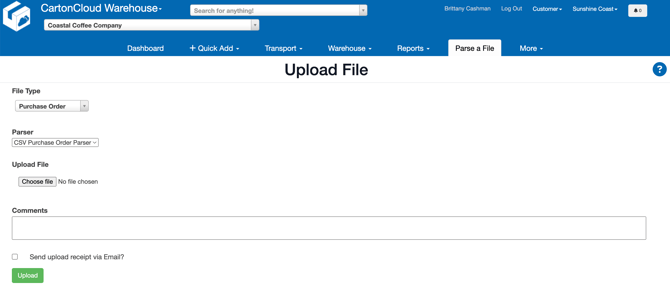
- Navigate to the Parse a file page, Parse a File.
- Select the File Type (the type of order you are uploading, e.g Purchase Order).
- Select the relevant Parser.
- Select the file.
- Click Upload.
Another option to upload a Parser is to email the file in. To do this you need your CartonCloud account owner/3PL to have set this up for the email address you will be emailing from. In addition they will need to provide you with an email address to send the parser to.