Table of Contents
Please note this is a WMS Premium only feature. For more information on WMS Premium and to upgrade your account please reach out to our Service Desk team here.
Purpose
White Labelling allows you to provide a seamless brand experience within the CartonCloud application for your organisation and your customers. With White Labelling you can customise your warehouse web app design by choosing to update the header with your own logo and select the background colour (white or blue).
Considerations
- White Labelling is a WMS Premium only feature. For more information on WMS Premium and to upgrade your account please reach out to our Service Desk team here.
- Changes made at the White Labelling settings will be applied for all users.
- Only Admin users have the ability to access and make changes to White Labelling.
How to customise White Labelling
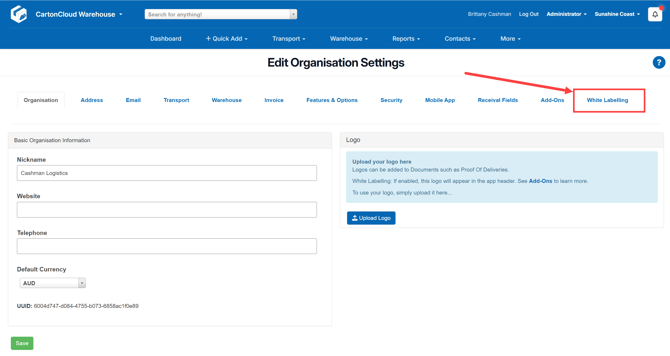
- Navigate to the Organisation Settings, More > Organisation Settings.
- Select the White Labelling tab.
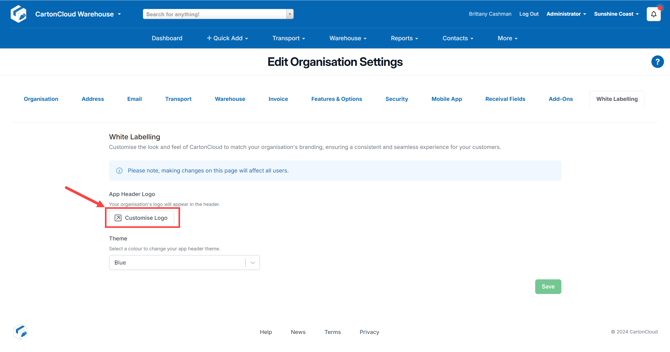
- From here you can customise the app header logo and the colour theme of the app header.
- Notice that changes made will instantly be applied to offer you a preview of what the changes will look like in the application. Only once you select save will the changes be applied.
- For the logo, the logo you have selected as the Organisation default will be applied here. Click Customise Logo if you wish to upload a logo or change the current logo you have set up.
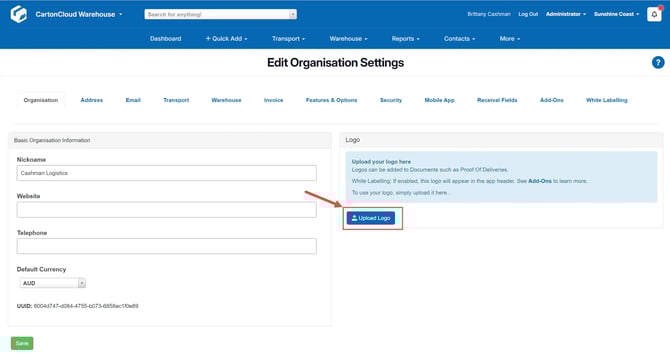
- This will take you to the Organisation tab on the Organisation Settings. Select Upload Logo or Override Logo (if you already have a logo selected) to select the logo you wish to apply. Keep in mind the logo you select should have a transparent background so that it works with the colour background selected.