Table of Contents
Please note this is a WMS Premium only feature. For more information on WMS Premium and to upgrade your account please reach out to our Service Desk team here.
Purpose
Enterprise security strengthens account protection by allowing you to enable Enterprise Single Sign-On (SSO) and/or Multi Factor Authentication (MFA) across all or specific user roles in your organisation.
Considerations
-
A user can only be using either SSO or MFA at one given time. Therefore, when enabling enforcement on user roles you will be applying the security measure the user has in place (either SSO or MFA).
-
Enterprise security is only available in WMS Premium. For more information on WMS Premium and to upgrade your account please reach out to our Service Desk team here.
-
Only Admin users with user editing permissions can access the Enterprise Security settings, and only those who are logged in via either MFA or SSO can make changes.
- Only users who are enrolled in MFA can enable MFA for user roles.
-
For users who have previously logged in without MFA, their session will continue to work for up to 24 hours before they will be forced to use MFA to continue.
How to enable Enterprise Security
-
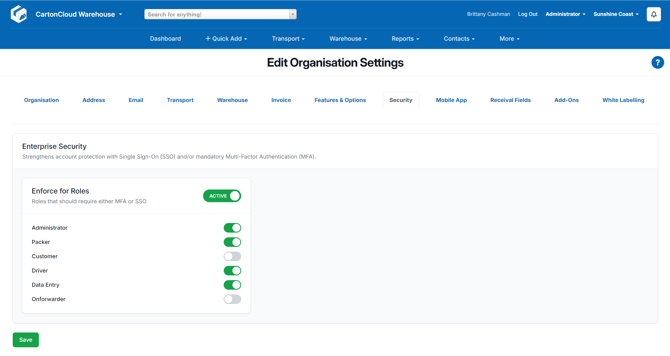
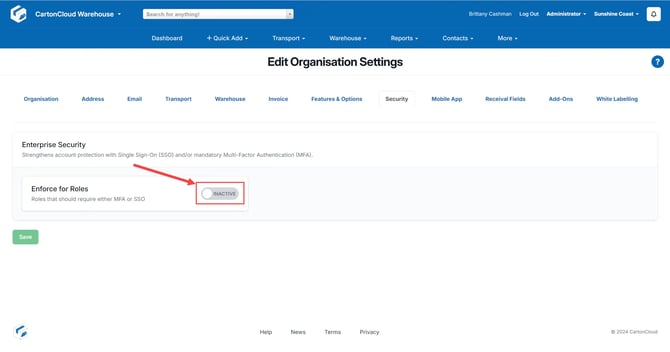
Slide the Active toggle to enable the Enfore for Roles feature. This will allow you to choose which user roles you wish to enforce the utilisation of SSO/MFA for.
-
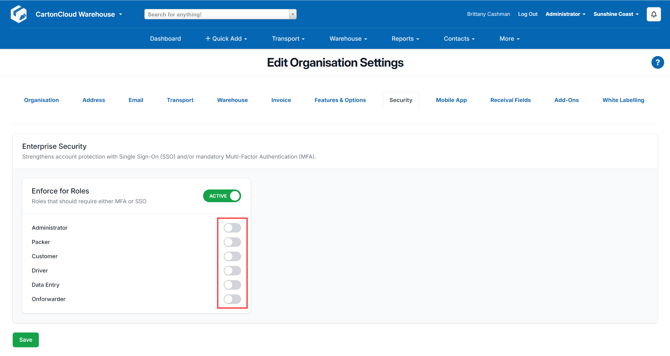
Select the roles you wish to enforce MFA/SSO for.
-
You can choose to enable all roles or only specific roles.