
Table of Contents
Consignment custom fields
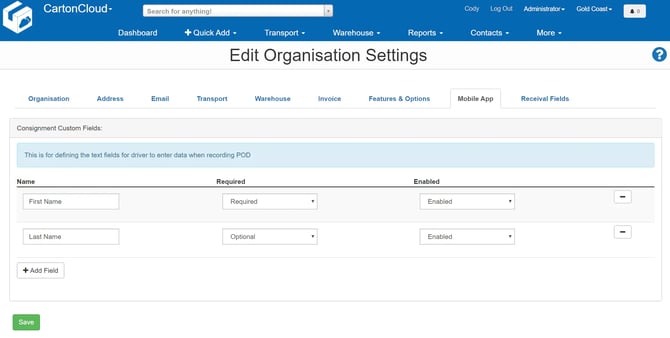
Custom text fields are customisable fields that a driver either optionally or must enter information against when signing off a delivery. By default, two fields will already be set up, and they include the receiver first name (required and the last name (optional).
To add a new custom field:
- Select the +Add Field button.
- Enter the name for the field.
- Select if you would like it to be required or not.
- Select if you wish to enable it.
- Click Save.
To remove a custom field:
- Select the - button against the field.
To edit a custom field:
- Make changes as required and then select Save.
Proof of Delivery
| Require Proof of Delivery Photos |
Yes - Photos will be required when capturing a POD No - Photos will not be required when capturing a POD |
Consignment Items
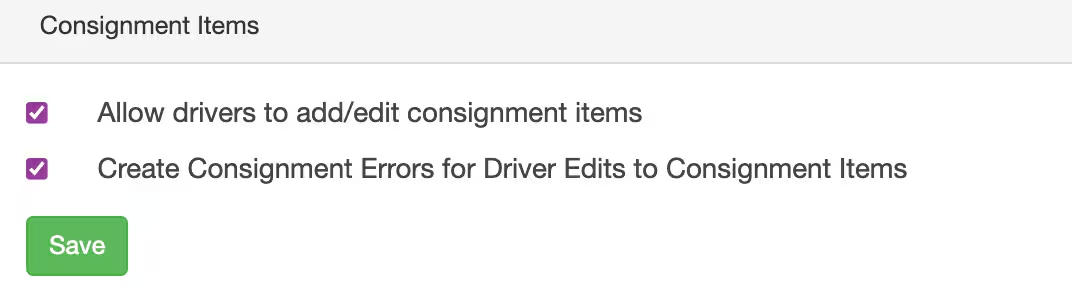
For more information please see Add/edit Consignment Items for Drivers on the Mobile App.
| Setting | Explanation | Enabled | Disabled |
| Allow drivers to add/edit consignment items | Allows your drivers to edit and add Consignment Items to the Consignments allocated to them via the mobile application. | All your drivers (unless the setting is overwritten at the user setting level) will be able to edit and add Consignment Items to Consignments allocated to them via the mobile application. | Your drivers will NOT be able to edit and add Consignment Items to Consignments allocated to them via the mobile application. The only exception to this is if the user settings are set to Yes, then they will override the Organisation Settings. |
| Create Consignment Errors for Driver Edits to Consignment Items | Will create a Consignment error when a driver edits or adds Consignments Items on a Consignment. | A Consignment Error will be automatically created for driver edits to Consignment Items. | NO Consignment error will be created for driver edits to Consignment Items. |