
Table of Contents
- Requirements for implementing this use case
- How to steps
- Set up for only charging to the Onforwarder address
Requirements for implementing this use case
- Your responsibility ends when the Consignment is delivered to the Onforwarder and you will charge the customer to the end destination. If you only want to charge to the Onforwarder address, please see here.
- You have a small number of Consignments going to the Onforwarder and wish to allocate the Consignments to regulalr Delivery Runs. You want the Onforwarder address to be inserted automatically and the CartonCloud handle the allocations based on the Onforwarders postcode and suburb.
How to steps
To set this up in CartonCloud you will need to create a Delivery Address to Onforwarder Address Mapping (A2A):
- More -> Site Map -> Delivery Address to Onforwarder Address Mapping
- Click Add Mapping

- Simply create a Mapping from the desired Delivery Address, ie: Sydney Packaging & Labels, Unit 2, 109 Percival Rd, SMITHFIELD, New South Wales, Australia to the Onforwarder Address: Max Transport, 1 Carton Way, CAROLE PARK, Queensland, Australia
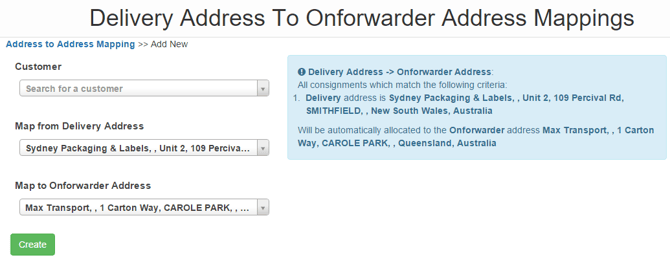
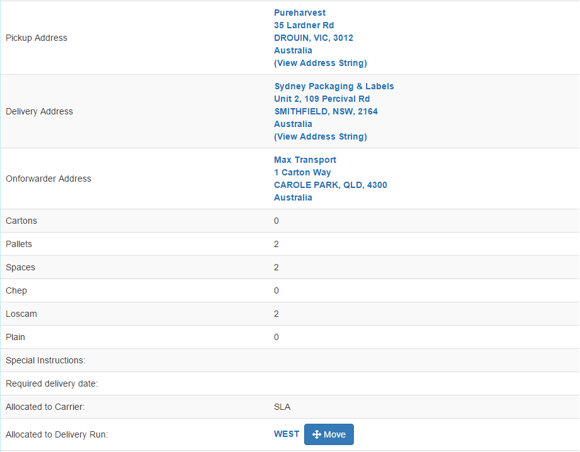
- Now, any consignment which is manifested with the Delivery Address of Sydney Packaging & Labels, , Unit 2, 109 Percival Rd, SMITHFIELD, , New South Wales, Australia will be automatically given the Onforwarder Address: Max Transport, 1 Carton Way, CAROLE PARK, Queensland, Australia, however it will remain on your regular WEST Delivery Runs simply based on the Suburb and Postcode of the Onforwarder Address (via Delivery Zones).
Set up for only charging to the Onforwarder address
- Navigate to the relevant Delivery Run.
- Select the Details tab and then Edit.
- Open the Advanced Options and untick 'If Onforwarder Address Exists, charge for delivery to the Onforwarders Address (untick if you want to charge to the delivery location always).'
- Click Save.