
Table of Contents
- What is Notification Emails
- Warning when using Notification Emails
- Available Notification Emails
- How to set up Notification Emails
What is Notification Emails
CartonCloud allows you to set up email notifications for your customers and also your internal staff. From the Notification Emails page you can set up internal notifications and from the Customer Settings you can set up customer email notifications. See Configuring Outgoing Notification Emails to Customers for steps on how to set up customer email notifications.
Warning when using Notification Emails
Please note when using these notifications that every customer will be included in each notification. Therefore, it is highly recommended you only include company internal emails and NOT customers.
Available Notification Emails
| Notification | Description |
|---|---|
| Sale Order Successfully imported (via Parser) | When a Sale Order is successfully imported (applies for every customer) via a parser |
| Purchase Order Successfully imported (via Parser) | When a Purchase Order is successfully imported (applies for every customer) via a parser |
| Sale Order Approved (by customer) | When a Sale Order is approved by a Customer from their login (applies for every customer) |
| Purchase Order Approved (by customer) | When a Purchase Order is approved by a Customer from their login (applies for every customer) |
| Manifest Approved (by customer) | When a Manifest is approved by a Customer from their login (applies for every customer) |
| New Consignment Error Created Notification (Filtered) | When a consignment error is recorded (for every customer) |
| Awaiting Stock Sale Order now available | When a Sale Order moves from "Awaiting Stock" to "Awaiting Pick and Pack" |
How to set up Notification Emails
- Navigate to Notification Emails by typing Notifications into the Search for anything bar and select Notification Settings.
- Click +Add Email Address.

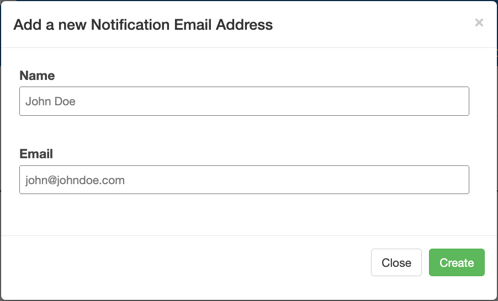
- Enter the Name and Email and click Create.
- Tick the relevant notification you would like the email address to receive.
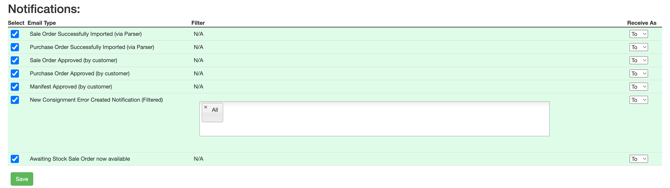
- Click Save.