Table of Contents
Purpose
If you want to move a consignment to a different run, change the date that the consignment is scheduled to be delivered, or change which driver is doing a delivery, you can do it from multiple places:
-
From the View Consignment Page.
-
From the View Delivery Run Page.
- From the View Run Sheet Page.
Selecting consignments to move
View Consignment Page
- On the top Menu click:
- Transport --> Consignments --> (then find the Consignment you want to move) --> scroll down the page a little and you'll see the Move button.
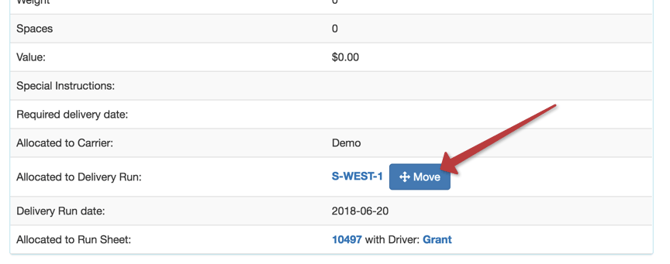
- The Move button is a little way down the View Consignment Page.
View Delivery Run Page
- On the top Menu click:
- Transport --> Delivery Runs --> (then find the Delivery Run you want to move):
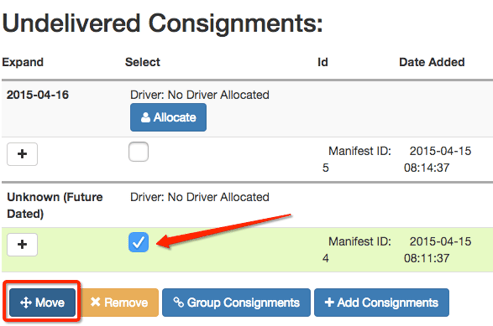
- Select the Consignment(s) you want to move and then click the Move button.
View Run Sheet Page
- On the top Menu click:
- Transport --> Run Sheets --> (then find the Run Sheet you want)--> Click on the 'Consignments' sub menu.
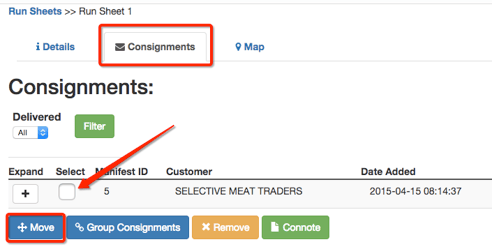
- Select the Consignment(s) you want to move and then click the Move button.
Move Page
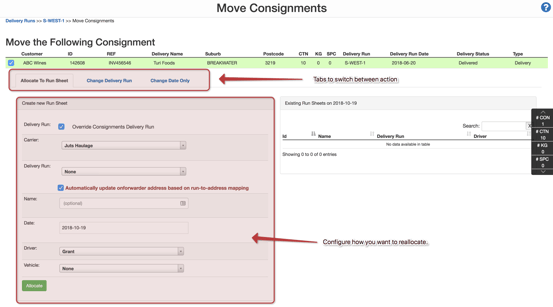
- Note that at the top of the page there are a number of tabs which allow you to switch between allocating, changing dates and switching runs.