
Table of Contents
Purpose
CartonCloud does not allow customers to be Deleted, only Deactivated. This is to ensure historical data is stored safely.
Therefore, if you find that you've created two clients with the same name, you can merge them together.
This should be approached with extreme caution, it will merge all records (consignments, invoices, etc). And is an irreversible operation.
Example Case
If you have 2 customers - Customer 1 and Customer 2 and you wish to merge them together. You must first decide which customer you wish to retain and which customer will be deactivated in your database.
You wish to retain Customer 1:
- Contacts > Customers.
- Click into Customer 2.
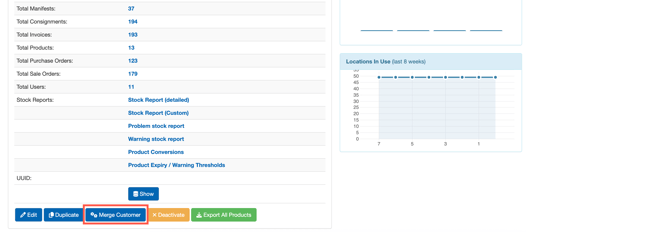
- Click the blue Merge Customer button.
- The pop-up screen will appear promtping you to agree to the changes.
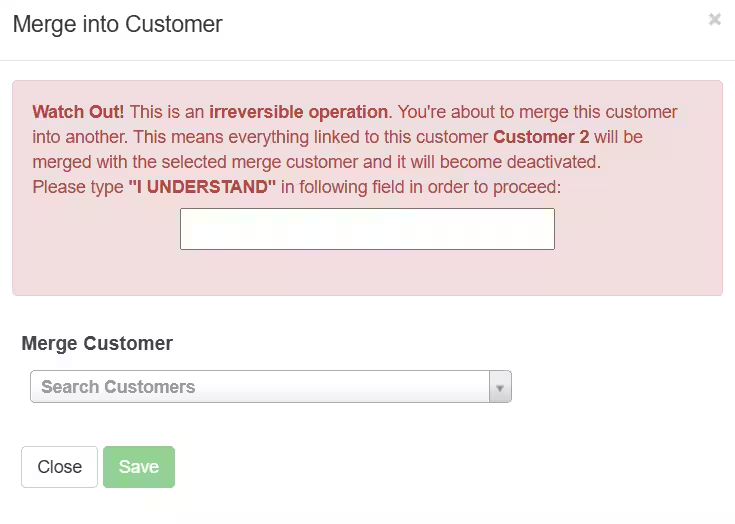
- Select Customer 1 from the drop-down box Merge Customer.
- Click Save.
- Customer 2 will merge into Customer 1. This means that Customer 2 will be deactivated and Customer 1 will remain.