Table of Contents
Overview
How to manage billing for your Self-Managed Integrations. It's important to understand that this is a paid integration.
Once the Self-Managed Integration is active, billing will begin automatically at $10 per week per integration billed weekly.
Billing for Self-Managed Integrations will stop automatically when the integration is disconnected.
Managing Self-Managed Integrations
Because Self-Managed Integrations are a paid feature, it is important you are able to manage and keep track of the number of active integrations your customer's have. This is useful if you wish to pass on the cost to your customer and reconcile your invoices.
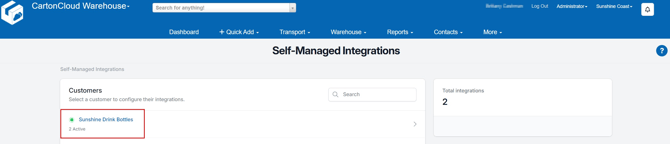
If a Customer has a live integration they will have a green dot icon against their name. It will also display the number of active integrations for that customer below their name.
Disconnecting a Self-Managed Integration
If you need to cancel and disconnect the integration you will need to:
-
Navigate to the Self-Managed Integrations page.
-
Select the relevant Customer.
-
Click the connected integration (Shopify, Xero, etc).
-
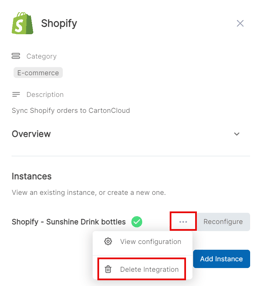
Select the three-dot configuration icon and select Delete Integration.
-
This will remove the integration and stop the billing of the integration to your account.