Table of Contents
- Purpose
- Benefits
- How to enable automatic leeching invoices
- To resolve charge errors on a daily basis (for Leeching Invoices)
Purpose
Leeching invoices build the invoice throughout the invoice period, "Leeching" in all Sale Orders, Purchase Orders, Consignments, Manifests and Storage charges. Rather than the invoice being created at the end of the invoice period, a Leeching Invoice will be created at the start of the invoice period and continue to grow until the end of the invoice period.
The leeching invoice will only be created once there is a charge to process. For example, if the first order you charge a customer for in the invoice period is created on the Tuesday then the leeching invoice will be generated on the Tuesday night and will be available on the Wednesday morning.
Benefits
The major benefit of Leeching invoices is that you are able to resolve charge errors as they appear throughout the week rather than having to deal with all errors at once at the end of the invoice period.
How to enable Automatic Leeching Invoices
Please note, currently, this cannot be done in Bulk. If you require this, please contact us and we'll shift all your customers over to operate like this.
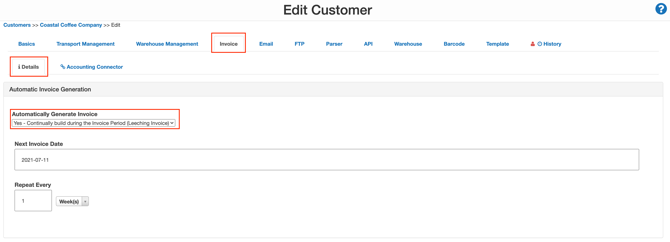
- Navigate to Contacts>Customers.
- Select the relevant Customer you wish to allow Leeching invoices for.
- Click Edit.
- Select the Invoice tab and then the Details tab.
- From the Automatically Generate Invoice drop-down menu select Yes - Continually build during the Invoice Period (Leeching Invoices).
To resolve charge errors on a daily basis (for Leeching Invoices)
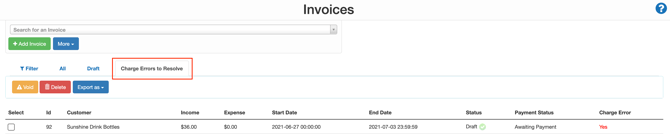
- Navigate to the Invoices page, More>Invoices.
- Select the Charge Errors to Resolve tab.
For information on how to resolve Charge Errors please see the Invoice Charge Errors page.