
Table of Contents
- Wave picking label sorting
- Multiple field sorting
- Example of multiple field sorting
- Removing unwanted sort options
Wave picking label sorting
Sale Order Picking Labels that are printed from Wave Picks can be sorted using the "Picking Label Sort Options" setting located in Organisation Settings → Features & Options → Picking Configuration.
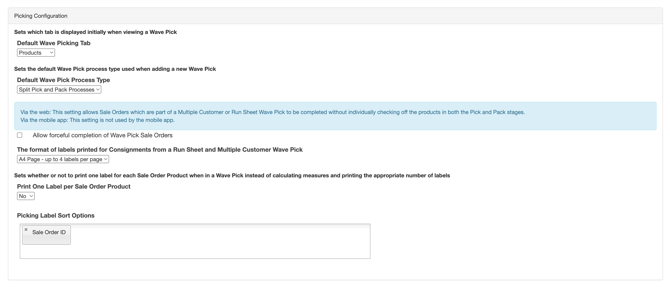
This option allows for the labels to be sorted by multiple fields. The available fields are currently:
- Sale Order ID
- Product Type (eg. Chilled, Frozen, etc)
- Product SKU (Product Code)
- Sale Order Reference
- Warehouse Location (AA-01, AA-02, etc)
The options Product Type, Product SKU, Sale Order Reference and Warehouse Location are sorted in ascending alphabetical order. Sale Order ID sorts in ascending numeric order.
Multiple Field Sorting
To sort labels using multiple fields, select the fields you wish to use and then drag the boxes around until they are in the order you wish to use. When using multiple fields, the labels are sorted using the options from left to right.
Example of Multiple Field sorting
Say that you wanted to sort by Product Type, then by Warehouse Location, then by Product SKU.
The field would look like this: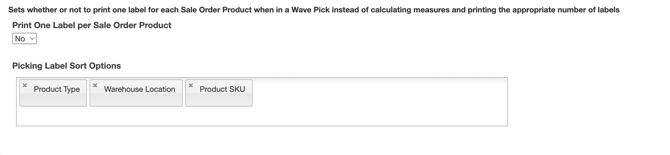
Removing Unwanted Sort Options
To Remove any unwanted sort options click the little 'x' icon on the tag for the option you wish to remove.